Setting Up eufy S380 HomeBase (HomeBase 3) in the eufy Security App

This article is designed to help you set up your eufy HomeBase 3 in the eufy Security app. 


Download the eufy Security App

  1. The eufy Security app is compatible with Android OS (8.0+) and iOS (11+) phones and tablets. Visit eufy Security app to learn more about the app.
  2. Please make sure you have downloaded the latest version of the eufy Security app. You can download the eufy Security app from the App Store (iOS devices) or Google Play (Android devices). Or visit eufylife.com on your mobile device. 
  3. For a complete walkthrough of the eufy Security app functions, please visit eufy Security App Function Guide for details.


Create Your eufy Security Account

After downloading the app, simply create a new account or log in to your existing account. Learn more about Sign Up for a eufy Security Account.


Add eufy HomeBase 3 in the App

  1. Device Page > ”+” icon > Add Device > HomeBase 3.


  1. Choose an existing Home profile or create a new Home profile.


  1. Follow the instructions on your mobile device’s screen to add your HomeBase 3
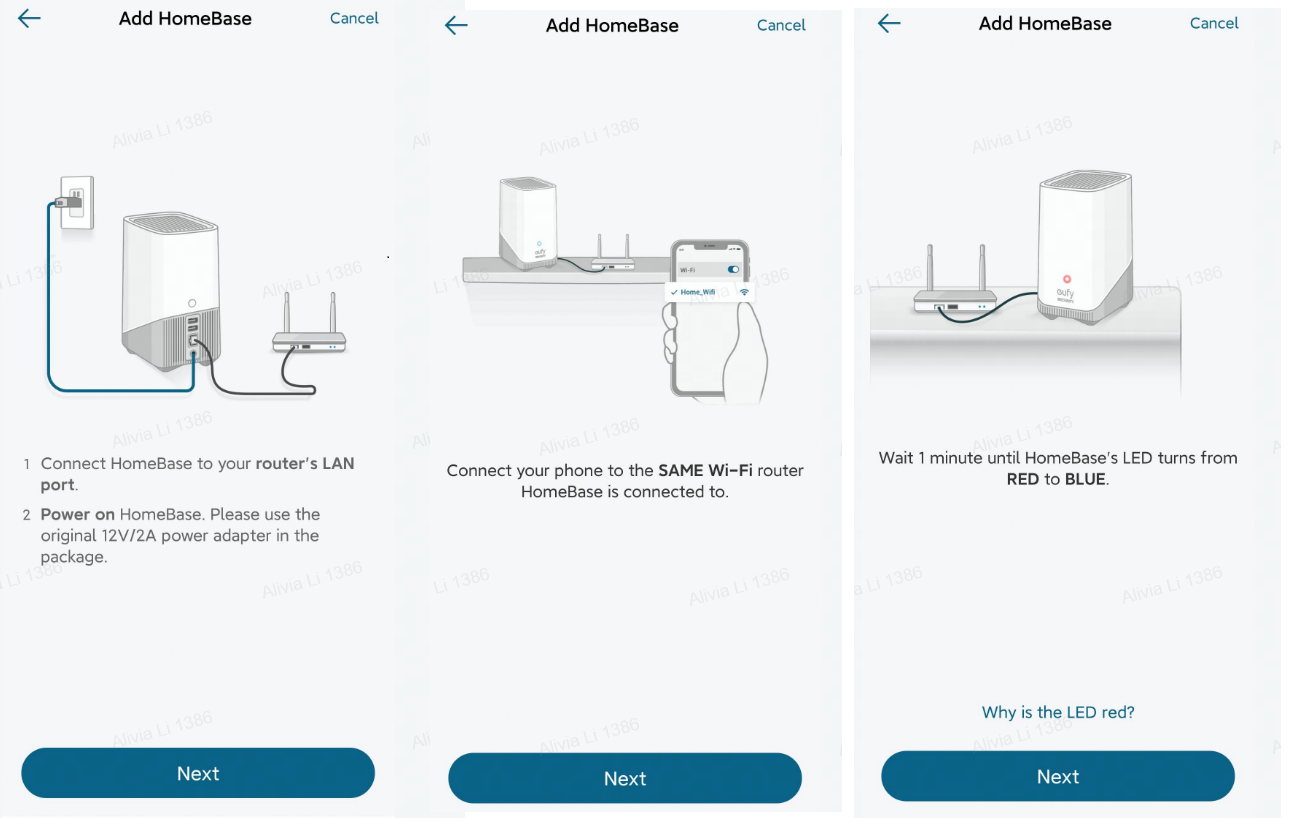
  • Connect the HomeBase 3 to your WiFi router’s LAN Port.
  • Power on the HomeBase 3. Please use the original 12V/2A power adapter included in the package.
  • Connect your phone to the Same WiFi router that the HomeBase 3 is connected to.
  • Wait one minute until the HomeBase’s LED indicator light turns from Red to Blue.


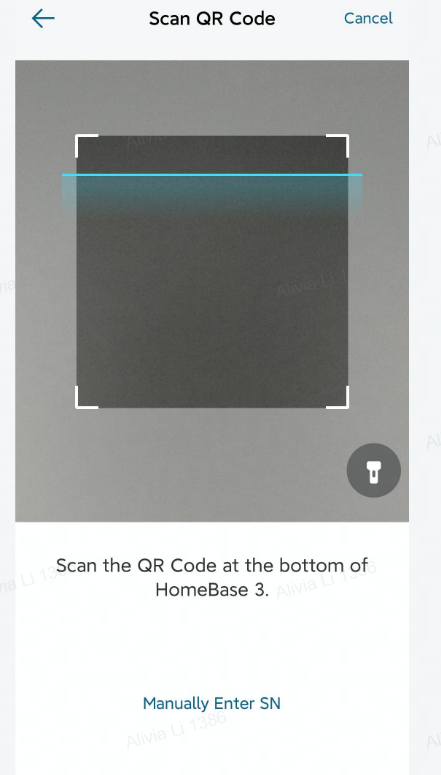
  1. Tap Next and scan the QR code located at the bottom of the HomeBase 3. You can also manually enter the HomeBase’s serial number to proceed to the next step. 


  1. When the HomeBase 3 is emitting a sound, please press and hold the SYNC/ALARM OFF button located at the bottom of the HomeBase 3 for two seconds until you hear a short beeping sound.


  1. Your HomeBase 3 will be successfully connected shortly, please create a name for the HomeBase 3 to complete the setup process.


If you failed to add your HomeBase 3 in the eufy Security app, please refer to this article for troubleshooting steps: Failed to Add eufy S380 HomeBase (HomeBase 3) in the eufy Security App 


If you have any further questions, please contact us for assistance.


Setting Up eufy S380 HomeBase (HomeBase 3) in the eufy Security App
106 undefined
S380 HomeBase (HomeBase 3) Compatibility
200327 views/36 likes/2024-12-25 14:45:40
Differences Between All eufyCams
7719 views/1 likes/2025-11-05 10:27:38
Introducing eufy S380 HomeBase (HomeBase 3)
12276 views/1 likes/2025-04-07 18:06:40
What is the S380 HomeBase(HomeBase 3) storage type?
12466 views/1 likes/2025-04-07 18:03:13
eufyCams Cannot Be Charged
11197 views/1 likes/2025-04-08 13:37:23
S380 HomeBase (HomeBase 3) Goes Offline
10230 views/1 likes/2025-04-07 18:03:14
Issues of the Hard Drive in S380 HomeBase (HomeBase 3)
8493 views/1 likes/2025-04-07 18:06:16
eufyCam_E330 (Professsional)_4-Cam_Kit_QSG_EU
eufyCam_E330 (Professsional)_Add_On_QSG_EU
T8600 eufyCam E330 (Professional) EU Declaration of Conformity
eufyCam E330 (Professional) User Guide (T8600)
V1_T8160C_QSG_CS
V1_T8160C_QSG_FI
View More
eufyCam E330 Installation Guide - adjust the angle vertically
eufyCam E330 Installation Guide - adjust the angle horizontally
How to Schedule Your eufySecurity Devices
eufy Security App Functions
How to Turn On / Off the Snooze Feature
How to Schedule Your eufySecurity Devices
View More