Pre-Pairing is a convenient feature on select eufy security kits. It automatically connects cameras and the HomeBase during initial setup, so you spend less time on manual steps.
Overview
Pre-Pairing means the cameras and HomeBase in your kit are already paired at the factory. When you add devices through the eufy app, the pre-paired cameras are detected automatically — no individual setup needed.
Note: Pre-Pairing eliminates the need to pair cameras one by one. You still need to complete the HomeBase setup through the app to connect all devices to your home network.
Standard Setup vs Pre-Paired Setup
Standard Setup: Scan QR code to add HomeBase → Scan QR code for each camera → Configure network for each device (Approximately 10–15 minutes)
Pre-Paired Setup: Select Safety Kit → Add HomeBase → Cameras are detected automatically → Setup complete (Approximately 2–5 minutes)
Supported Products
The following kits come pre-paired from the factory:
-
eufy LocalSecure System (Premium Solution)
-
eufy LocalSecure System (Premium Solution with Video Doorbell)
Setup Steps
Preparation Before Setup
-
Download and open the latest version of the eufy app (V6.0.40 or above).
-
Register a new account or log in to your existing account.
-
Make sure your phone is connected to a 2.4 GHz Wi-Fi network.
Step 1: Select Safety Kit
-
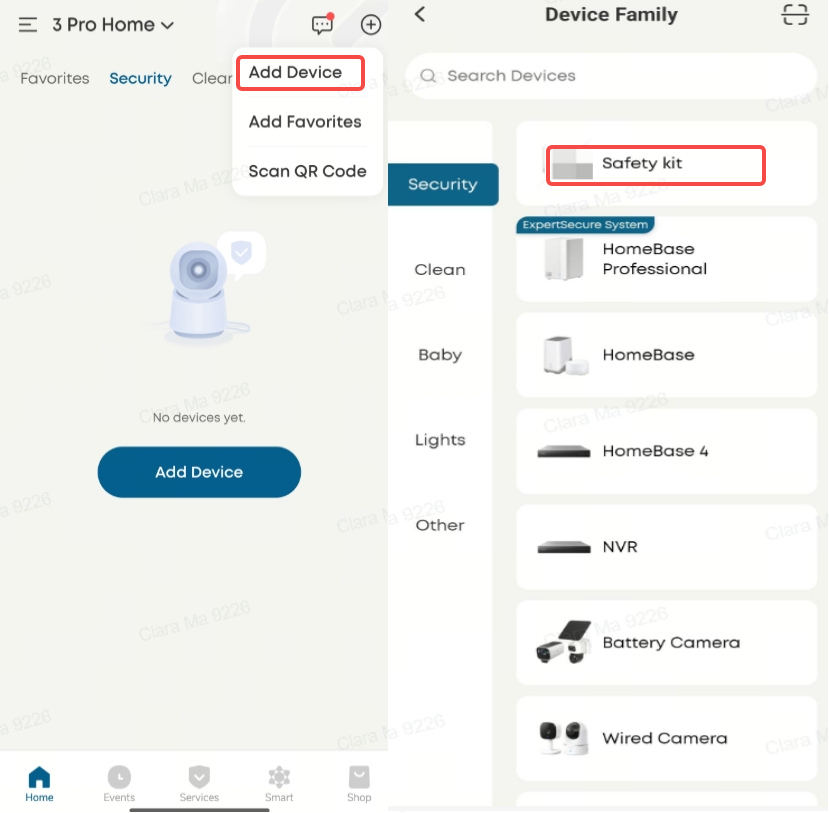
On the app homepage, tap the "+" icon in the top right corner.
-
Select "Add Device".
-
In the device type list, select "Safety Kit".
Step 2: Complete Pre-pairing Verification
-
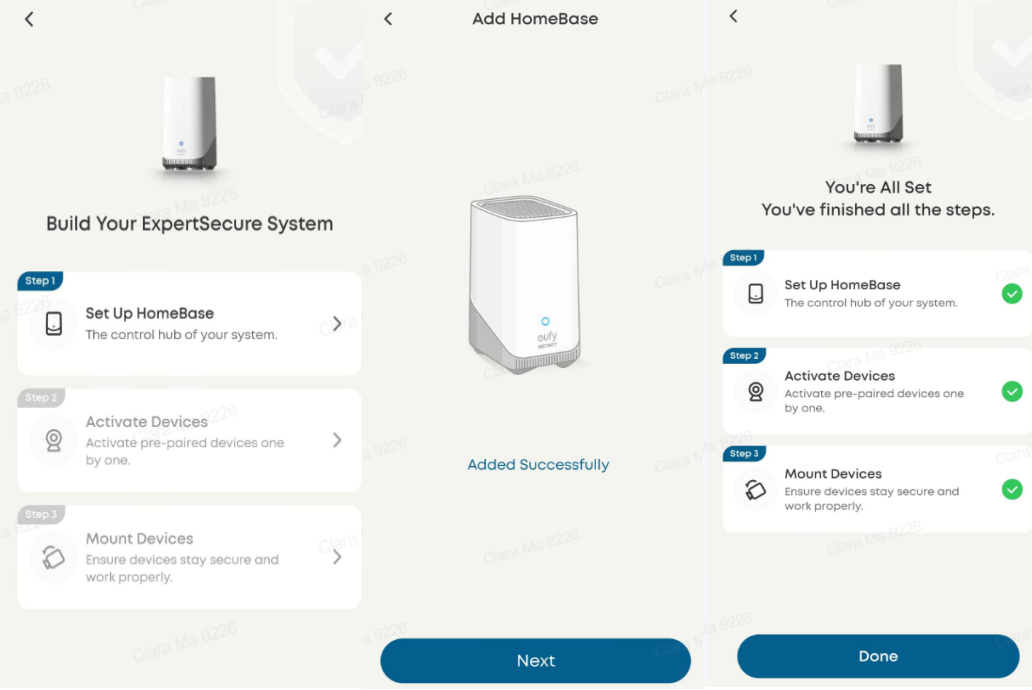
After selecting Safety Kit, follow the on-screen instructions to scan the QR code on the bottom of the HomeBase.
-
The app will automatically detect all pre-paired cameras and prompt "Enter Pre-pairing Verification".
-
Wait for the HomeBase and cameras to sync.
-
Tap "Done", and all devices will be displayed on the app homepage.
Troubleshooting
Not All Cameras Detected
If the app does not detect all cameras in the kit, try the following:
-
Make sure the cameras have enough battery.
-
If you see unrecognized cameras, press and hold the SYNC button for 2 seconds (the LED will flash to confirm pairing mode).
-
Wait for the app to recognize them automatically. If that does not work, restart the HomeBase and devices, then try again.
-
If pre-pairing still fails, you can add cameras one by one using the standard setup method.
Network Connection Failed
-
Make sure your router is broadcasting a 2.4 GHz network. These devices only work with 2.4 GHz networks.
-
Make sure the Wi-Fi password you entered is correct.
-
If the problem persists, try connecting the device through your phone's hotspot.
Additional Information
-
Adding Additional Cameras Later: You can add extra cameras to your existing network through the "Add More Cameras" option in the app.
-
Need further assistance? Contact our customer support team.
If you have any other questions about the Homebase Mini, please don't hesitate to contact eufy Support Engineers for further assistance.


