EufyLife app - How do I view my weight trends, data history and delete measurements?

There are 3 ways to view the weight trends and data history:

  1. Simply click the three dots on the top right and you will see the trends and history button where you can enter the trends page and report history page.

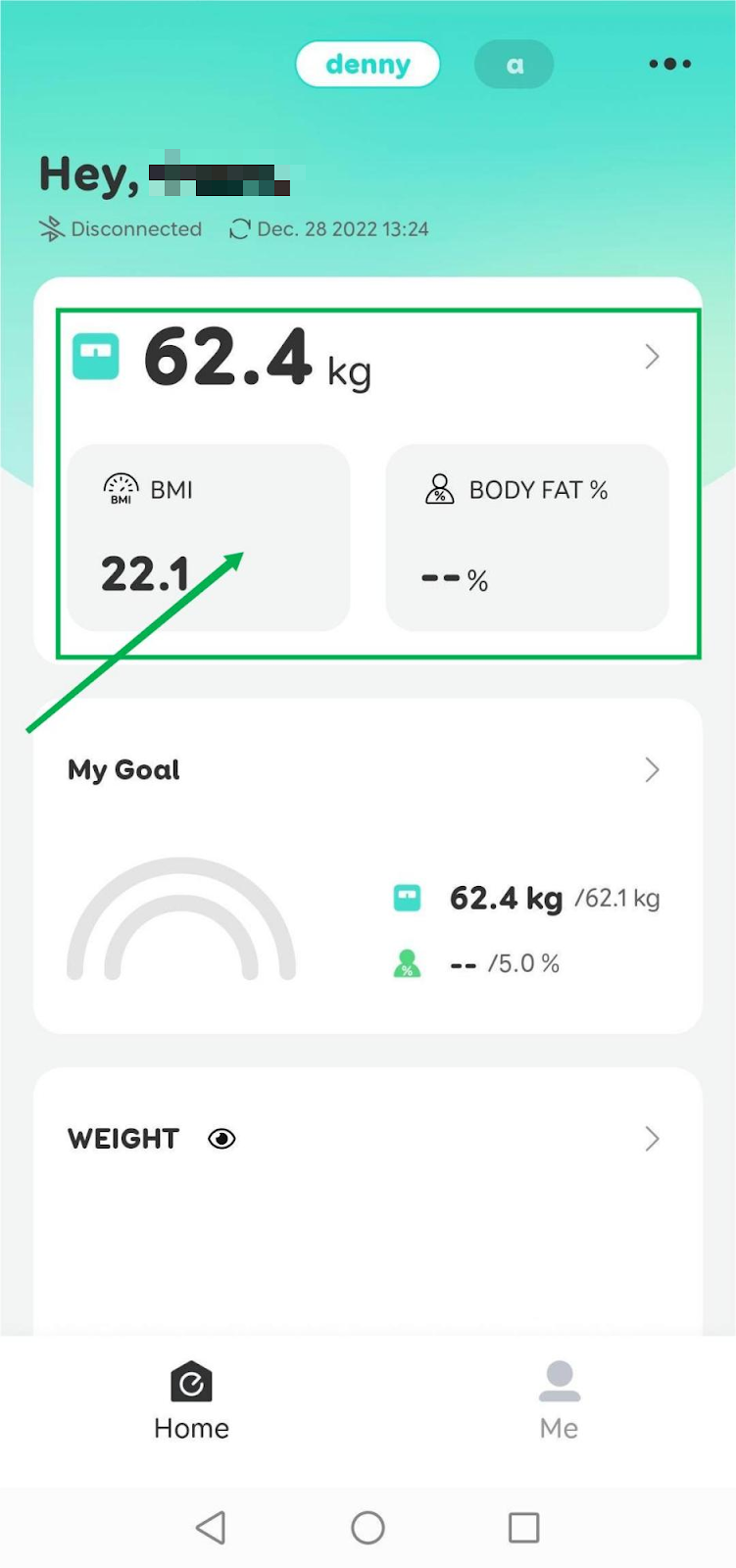
  1. For T9140/T9146/T9147, you can click anywhere on the measurement data card and you will enter the Trends view, where you can find the data trends for day/week/month/year. You can enter the report history by clicking the history at the bottom of the page.

  1. You can click the ">" button on the weight/data card, then you will enter the trends view. You can enter the report history by clicking the history at the bottom of the page.

Currently, we only support trends view for weight, BMI, body fat, and muscle mass. More measurements will be added in the future.

If you'd like to delete any measurements, click the edit on the right top and choose the measurements that you would like to delete, then select "Delete" at the bottom right corner.


If you have any further questions regarding the EufyLife app, please contact us.

Unresolved icon
81 undefined
Download icon
eufy Smart Scale A1 User Guide (T9120)
Download icon
Smart Scale A1_T9120_EN+AR_Manual
Download icon
【T9120】 Smart Scale A1 EU Declaration
Download icon
Smart Scale P3_EN+AR_Manual
Download icon
Smart Scale P3_EU_Manual
Download icon
Smart Scale P3 User Guide (T9150)
View More
Play videoEufy BodySense Smart Scale
Eufy BodySense Smart Scale
Play videoeufy Smart Scale P2 Series: How to Troubleshoot Inaccurate Body Measurements
eufy Smart Scale P2 Series: How to Troubleshoot Inaccurate Body Measurements
Play videoeufy Smart Scale P2 Series: How to Troubleshoot Inaccurate Weight Measurements
eufy Smart Scale P2 Series: How to Troubleshoot Inaccurate Weight Measurements
Play videoeufy Smart Scale P2 Series Unboxing Video
eufy Smart Scale P2 Series Unboxing Video
Play videoeufy Smart Scale P2 Series: How to Connect iOS Devices
eufy Smart Scale P2 Series: How to Connect iOS Devices
Play videoeufy Smart Scale P2 Series: How to Connect Android Devices
eufy Smart Scale P2 Series: How to Connect Android Devices
View More
Contact Us
Buy on the eufy Store
Download the App
affirmamazonPayamexapplePaydinnersClubdiscovergooglePaymastercardpaypalshopPayvenmovisa