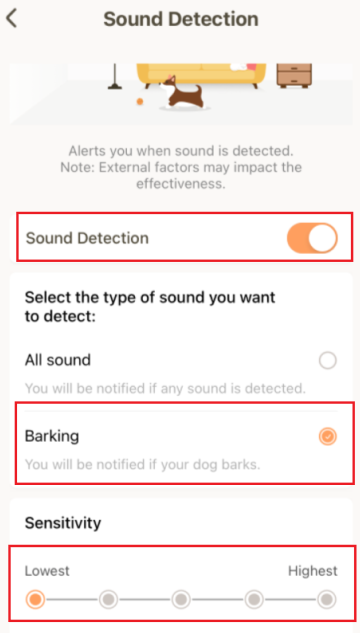
eufy Pet Camera is designed to detect both motion and sound, and the camera will alert you when sound is detected if the Sound Detection feature is enabled. In order to eliminate environmental factors from triggering sound detection, such as doors opening and closing, you can configure the setting of sound detection for the camera to only detect when your dog barks.
To change the type of sound detection, please launch the eufy Pet app > Profile > My Devices > Pet Camera > Sound Detection > switch from All sound to Barking, and then adjust the sensitivity level accordingly.

Note: If your dog tends to bark very often and it leads to excessive barking notifications, please visit Will I keep receiving barking notifications from eufy Pet App if my dog barks all the time? for detailed instructions on how to adjust the settings in the eufy Pet app.
If you have further questions regarding the barking detection feature on eufy Pet Camera, please contact us for assistance.







