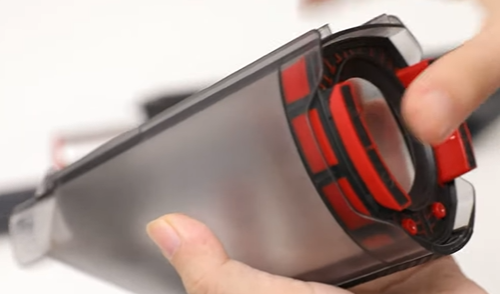
How to Clean the Dust Cup on H30?
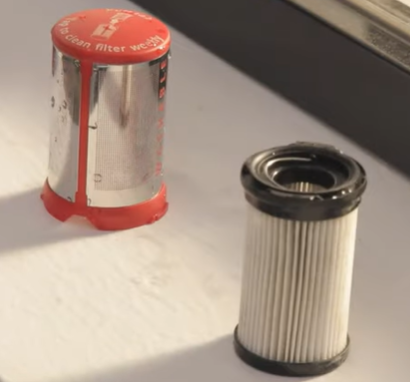
1. Press the Dust Cup release button to remove the dust cup to empty it.
2. If there is any remaining debris in the Dust Cup, remove the Sealing Ring to clean it. Rinse the Dust Cup and the Sealing Ring if needed.
P.S. To remove the sealing ring, refer to the following video
If you have further questions or concerns about cleaning the dust cup, please us at support@eufylife.com. Please send us pictures showing the specific issue.

How to Clean the Dust Cup on H30?


43 undefined
eufy Product Warranty FAQ
9520 views/
1 likes/2025-04-07 17:40:34
How to contact a Human Customer Service Representative?
14904 views/
1 likes/2024-11-27 10:43:42
How to order the right battery for my RoboVac and HomeVac?
25202 views/
2 likes/2022-12-29 10:31:47
eufy US Official Website Order FAQ
3190 views/
1 likes/2025-04-07 18:26:49
eufy UK Official Website Order FAQ (For UK only)
2708 views/
1 likes/2025-04-07 18:25:39
How can I provide sufficient proof of purchase to claim a warranty?
2360 views/
1 likes/2025-05-16 11:09:08
Payments & Vouchers FAQ
3786 views/
1 likes/2024-11-27 10:08:25
The Meaning of Indicator Lights on HomeVac H30
1226 views/
1 likes/2025-04-07 18:05:08
eufy Referral Program: Get $40 for Every Friend You Refer
3070 views/
1 likes/2024-01-19 18:13:25
Getting the Most out of Batteries of RoboVac
3853 views/
1 likes/2022-12-28 16:44:45

【T8010】【HomeBase 2】EU Declaration

T8113S_EU Declaration of Conformity

eufyCam_2C_Pro_Set_Manual_us

RoboVac 30C_Manual_EN

video_Doorbell_2K_(Wired)_Manual_us

Motion_Sensor_manual_us
View More


How to Connect RoboVac to iOS Devices


eufy 3-in-1 E20: Unboxing and Quick Start Guide Video


How to Install eufy Security Video Doorbell (Wired)


How to set up eufy Security Video Doorbell (Battery-Powered)


How to Install eufy Security Floodlight Camera


eufy Security App Functions
View More