To help you handle the wires of the wired doorbell, please follow the instructions below.
For hardware installation, please download the Quick Start Guide for wired doorbells in our help center. You can find it in “Manuals & Downloads” in every product category.
Requirement for Transformer
- Output voltage: 16-24 Voltage AC
- Output power: 30VA or above

Requirement for Original Chime
- Eufy wired video doorbell doesn’t work with the original chime.
- You need to bypass the original chime to make the wired doorbell operate properly.
- You can either use the provided jumper to bypass the chime or connect the wires on Trans and Front together.


Install the Doorbell According to the Transformer and Chime
Firstly, please check the quantity of doorbell buttons and existing chimes in your house and the amount of doorbells you are going to install. Then, you can go to the corresponding part for how to rework the doorbell wiring.
- Single Transformer + Single Video Doorbell
- Single Transformer + Two Chimes + Single Video Doorbell
- Multiple Transformers + Multiple Chimes + Multiple Video Doorbells
- Special Case - Reuse the Existing Intercom Wiring
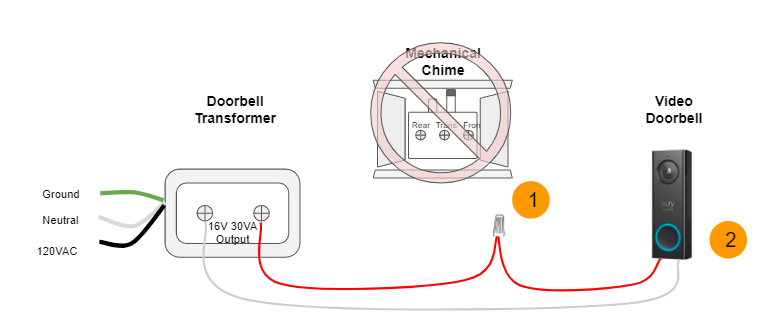
Single Transformer + Single Doorbell
Option 1: In the original doorbell wiring, when a visitor presses the doorbell button, the chime sounds.
1. Use the provided jumper to connect Trans and Front on the original chime.
2. Replace the original doorbell button with eufy video doorbell.

Option 2: In the original doorbell wiring, when a visitor presses the doorbell button, the chime sounds.
1. Remove the original chime. Connect the Trans wire and Front wire together.
2. Replace the original doorbell button with eufy video doorbell.
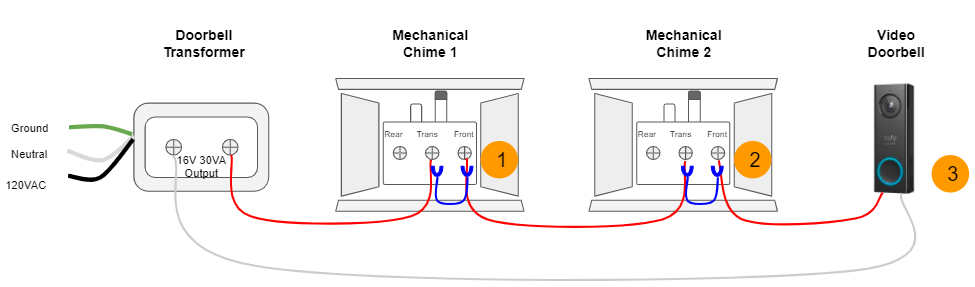
Single Transformer + Two Chime + Single Doorbell
Option 1: In the original doorbell wiring, when a visitor presses the doorbell button, both chimes sound simultaneously.
1. Use the provided jumper to connect Trans and Front on the first chime.
2. Use the provided jumper to connect Trans and Front on the second chime.
3. Replace the original doorbell button with eufy video doorbell.

Option 2: In the original doorbell wiring, when a visitor presses the doorbell button, both chimes sound simultaneously.
1. Use the provided jumper to connect Trans and Front on the first chime.
2. Use the provided jumper to connect Trans and Front on the second chime.
3. Replace the original doorbell button with eufy video doorbell.
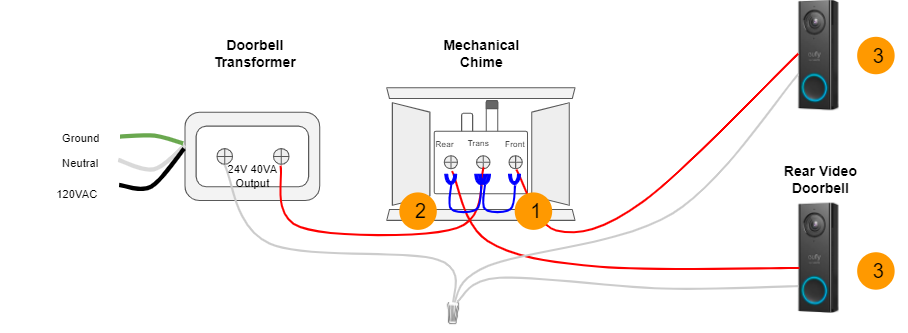
Single Transformer + Single Chime + Two Doorbells
In the original doorbell wiring, when a visitor presses either front or rear doorbell button, the chime sounds.
1. Use the provided jumper to connect Trans and Front on the original chime.
2. If you want to install two video doorbells at front door and rear door, you need to use the second jumper to connect Trans and Rear on the original chime.
3. If you want to power up two video doorbells, use a 24V 40VA transformer.
4. Replace the original doorbell button with eufy video doorbell.
Multiple Transformers + Multiple Chimes + Multiple Doorbells
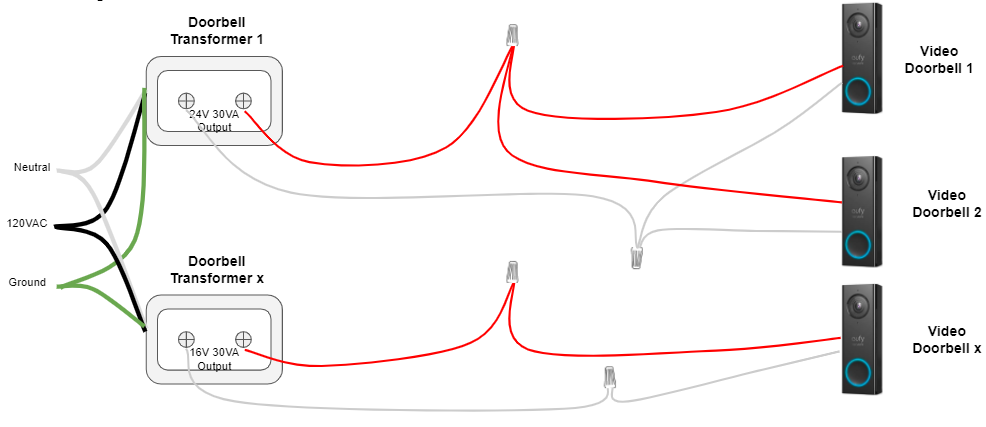
If the wiring is too complicated, we would recommend you disconnect all wires on original chimes and connect all wires back to the output terminals on the transformer. If you want to power up two video doorbells, please use a 24V 40VA transformer. See pictures.
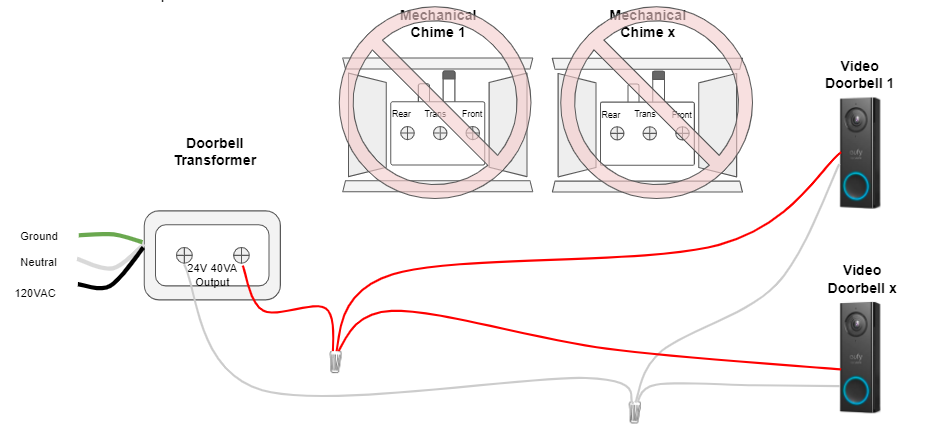
If you want to install more than two video doorbells, refer to the wiring diagram to install additional doorbell transformers and wiring.
Special Case - Reuse the Existing Intercom Wiring
The eufy wired video doorbell doesn’t work with existing intercom power and signal systems, but you can reuse the existing wiring if you no longer use the Intercom wiring.
1. Trace the wires from the outdoor device back to the indoor. For example, you select the specific color of the wires on the outdoor device and find the wires with the same color indoor.
2. Replace the original intercom device at the front door with a eufy wired video doorbell. Connect to the selected wires.
3. Get a power adapter to charge the wired doorbell (19V - 0.6A power adapter).
4. Connect the wires on the power cord to the selected intercom wires indoors.
5. Plug in the power adapter and check if the video doorbell is powered up.

To avoid the hassle of handling the wires, please connect the doorbell with a power adapter. For more information, please read How to Hardwire Your eufy Wired Doorbell without Existing Wires.
If you have any questions, please contact us for further assistance.







