How to Share eufy Pet Camera Videos in the eufy App
Please follow the steps below to share your eufy Pet Camera videos with family and friends!
Step 1) Launch the eufy app > tap the Activity tab at the bottom of the screen.
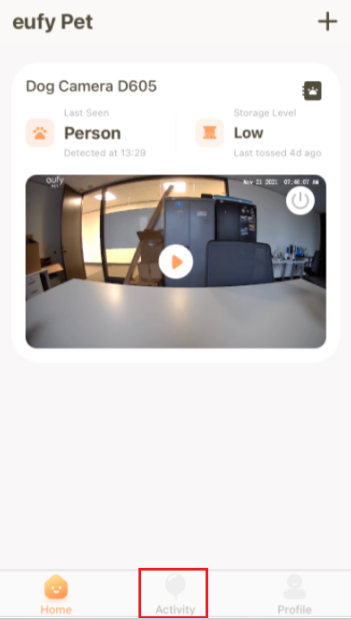
Step 2) Select and play the video that you would like to share with your family and friends.

Step 3) When the selected video is playing, tap the Share button at the bottom of the screen.

Step 4) Choose from the list of available options to share the video with your family and friends.

If you have further questions regarding how to share eufy Pet Camera videos in the eufy app, please contact us for assistance.


20 undefined


Can eufy Pet Camera D605 record 24x7?
Does eufy Pet Camera D605 support activity zones?
Which eufy app do I need for my eufy Pet Camera D605?
Does eufy Pet Camera D605 support 5GHz WiFi network?
Does eufy Pet Camera D605 work at night?
Is eufy Pet Camera D605 compatible with Amazon Alexa?

eufy_Pet_Camera_D605_manual_us
T7200 EU Declaration of Conformity V3.0


Launch Fur-tastic Fun with Pet Camera

eufy Pet Camera User Guide Video

Race to the Dog Camera Treats


