How to move some of the existing devices to a new Home in the eufySecurity app v4.0?
There are 2 methods to move some of the existing devices to a new Home in the
eufySecurity app v4.0.
1. Create a new Home and then move the existing devices from the existing Home to the new Home.
- Tap “Manage Home” > Add New Home > Name the new Home
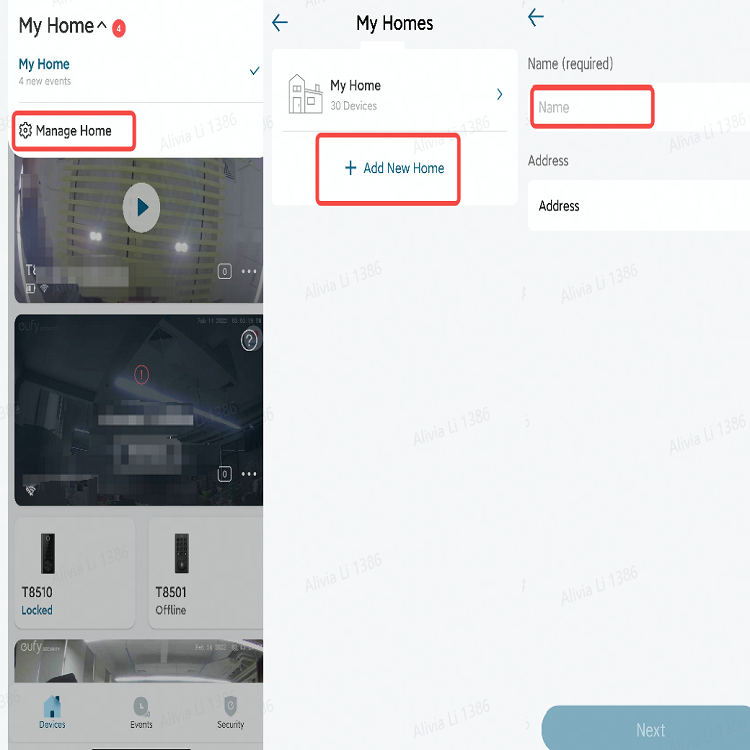
- Tap the existing Home > All Devices > “⇆” icon > choose the new Home

2. Move the existing devices from the existing Home to the new Home directly.
- Tap the existing Home > All Devices > “⇆” icon > Add New Home > Name the new Home > choose the new Home


800 undefined

SoloCam_L40_manual_eu
eufy Security Solar Panel User Guide (T8703)
Solar Panel (3W) User Guide (T8705)
Floodlight Cam E340 User Guide (T8425)
Floodlight Cam E340 User Guide
eufy Security Solar Panel Guide de l'utilisateur (T8703)
View More


How to Mount Your eufyCam E

How to Mount Your eufyCam
How to Mount Your eufyCam
How to Mount Your eufyCam
How to Mount Your eufyCam
How to Mount Your eufyCam
View More


