How to switch off my Garage-Control Cam in the eufy Security app?
You can switch off the Garage-Control Cam in the eufy Security app by going to the Devices Tab Page > Garage-Control Cam > the “…” Icon > Gear Icon > Settings.
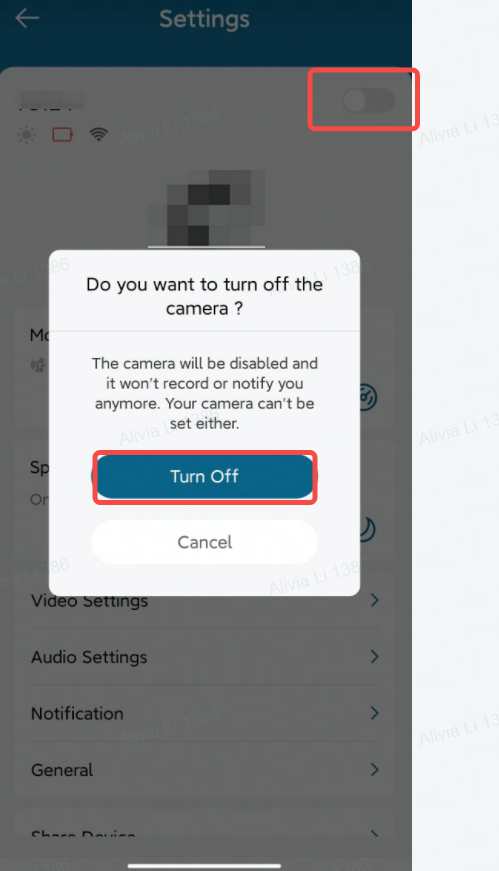
If there are any other questions regarding the eufy Garage-Control Cam, please contact us for assistance.


81 undefined
How to contact a Human Customer Service Representative? 22234 views 1 likes/2024-11-27 10:43:42
What is the maximum number of devices that can be added to the eufy Security app? 12227 views 1 likes/2025-04-07 17:40:13
Cross-Camera Tracking Function Compatibility 12131 views 1 likes/2025-04-07 18:26:50
Failed to Scan the QR Code on the eufy Security Device 11743 views 1 likes/2025-04-07 18:26:49
How to connect eufy Security devices to your phone using a mobile hotspot? 6732 views 1 likes/2025-04-07 18:04:33
How to open specific router ports for eufySecurity devices? 8853 views 1 likes/2025-04-07 18:26:50
Introducing the eufy Garage-Control Cam 3961 views 1 likes/2025-04-07 18:03:55
How to Change the WiFi Channels on Your Router 7611 views 1 likes/2024-11-27 10:28:06
Failed to Set Up eufy Security / eufy Pet / eufy Care Devices 10937 views 1 likes/2023-05-08 11:18:15
The Differences Between "Guest" and "Admin" Access in eufySecurity App 5663 views 1 likes/2025-04-07 18:26:49

【T8010】【HomeBase 2】EU Declaration

T8113S_EU Declaration of Conformity

eufyCam_2C_Pro_Set_Manual_us

RoboVac 30C_Manual_EN

video_Doorbell_2K_(Wired)_Manual_us

Motion_Sensor_manual_us
View More


How to Connect RoboVac to iOS Devices


eufy 3-in-1 E20: Unboxing and Quick Start Guide Video


How to Install eufy Security Video Doorbell (Wired)


How to set up eufy Security Video Doorbell (Battery-Powered)


How to Install eufy Security Floodlight Camera


eufy Security App Functions
View More


