How to switch off my Garage-Control Cam in the eufy app?
You can switch off the Garage-Control Cam in the eufy app by going to the Devices Tab Page > Garage-Control Cam > the "…" Icon > Gear Icon > Settings.
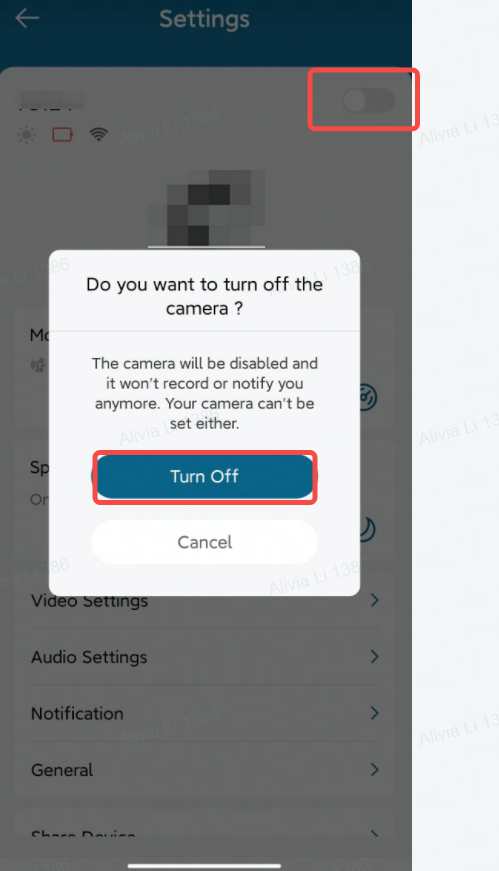
If there are any other questions regarding the eufy Garage-Control Cam, please contact us for assistance.


20 undefined
eufy Security / eufy Baby Devices Discharge Quickly


eufy Security / eufy Pet / eufy Baby Devices Go Offline
Image Quality Issues on eufy Security / eufy Baby / eufy Pet Devices
eufy Security / eufy Pet / eufy Baby Devices Cannot Power On
eufy Security / eufy Pet Devices Fail to Record Videos
How to open specific router ports for eufy devices?
Failed to Scan the QR Code on the eufy Device

Garage_Control_Cam_Manual

eufy Security Garage-Control Cam: How to Install and Set Up Using the eufy App


