“CAN I SETUP MULTIPLE CHIMES FOR 2K BATTERY DOORBELL?”
The answer is yes. There are four indoor chime options for the 2K battery doorbell. Steps in App: Devices page > Doorbell Settings > Indoor Chime.


Existing Doorbell Chime
Most families have an original doorbell, some are mechanical doorbells, and some are electronic doorbells. As its name indicates, a mechanical chime creates its sound by using a physical bell and a mechanical hammer and makes a traditional "ding-dong" sound. An electronic doorbell chime plays pre-recorded digital tones through an electronic speaker and often has a selection of different tones you can choose from.
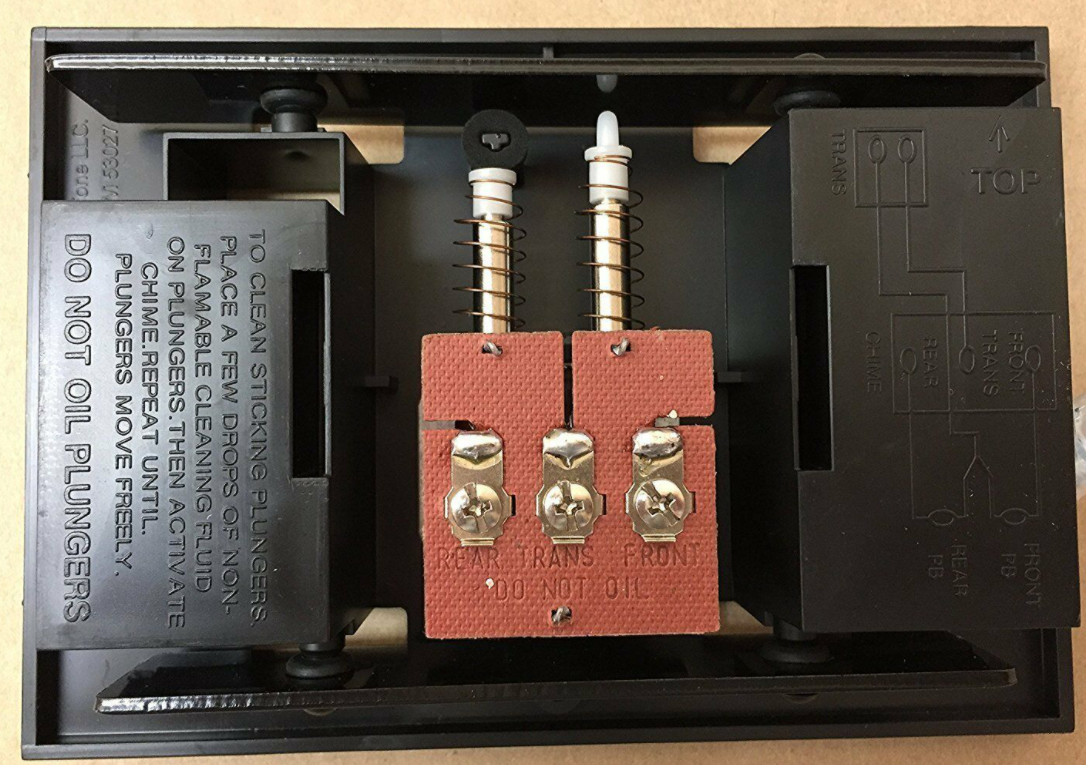

(Left: Mechanical Chime; Right: Digital Chime)
When you hardwire your 2K battery doorbell with the existing doorbell wires, the existing doorbell chime will act as an indoor chime.
How to Hardwire It?
1. Verify whether the doorbell wires are working. Always be careful when handling wires.
2. Detach the Existing Doorbell Button.
3. Find a Mounting Spot.
4. Mount the Bracket.
5. Connect the Doorbell Wires to the Doorbell. Wire can connect to any terminal.
6. Mount the Doorbell on the Bracket.
7. Restore Power.
To see the details with picture guided, please read the Appendix 3 of Quick Start Guide from page 19. It will guide you to the installation of existing doorbell wires. If the indoor chime is On and connected to your existing doorbell, it will ring when your doorbell button is pressed.
Eufy Doorbell Chime
Add on chime only for the 2K battery doorbell! Many of you may feel upset when you can’t hear the Homebase’s chime when upstairs. This USB dongle + doorbell chime is an accessory exclusive to the eufy 2K battery doorbell. Click here for the user manual.
One USB dongle can control up to four doorbell chimes. If you already have a USB dongle+add-on chime and want a second add-on chime, you can purchase the T8740 add-on chime without the USB dongle (T8740 also works with 2K wired doorbell). Then set up the add-on chime with the USB dongle.
The USB dongle can only work with HomeBase 2 when a eufy video doorbell is connected to this HomeBase 2 and the doorbell is pressed.
Homebase as Chime
Normally, the Homebase speaker acts as a chime. Enable the Homebase alert and the Homebase will alarm when the doorbell is pushed. You can adjust the Homebase ringtone and volume in the App.
Alexa as Chime
If you have Alexa devices, you are able to connect them with eufy doorbells for ring notifications. How to enable it?
1. Open Amazon Alexa App > Slide the side menu > Click ‘Browse Skills’ > Click ‘Skills & Games’.
2. Search ‘eufy Security’ skills.
3. Enable ‘eufy Security’ skills.
4. Enter your eufy account and password on ‘Link Account’ page
5. Close the “Successfully Linked” window to discover security devices you can control with Alexa.
6. Choose devices to set up in allocated rooms after ‘Discover Devices’.
7. Adjust the settings in Alexa for your preference.
8. Try out some commands, such as “Alexa, show me XXX (device name)”
If you want to know more about Alexa setup, please refer to Alexa Setup Guide for eufySecurity Devices.