To help you figure out why the cameras or doorbells stop recording and do not record events. This article applies to smart eufy devices using the eufy App, such as cameras, doorbells, floodlight, indoor cam. Please confirm the following settings to see how it works.
1. Make sure your cameras or doorbells are powered on and online.
2. Make sure you have enabled the Camera in camera/doorbell settings.
Steps: Device Tab> ... icon> Gear icon> Settings.
3. Make Sure the Motion Detection/Detection Mode has been enabled.
Steps: Device Tab> ... icon> Gear icon> Settings> Motion detection > Turn on the Motion Detection/Detection Mode.
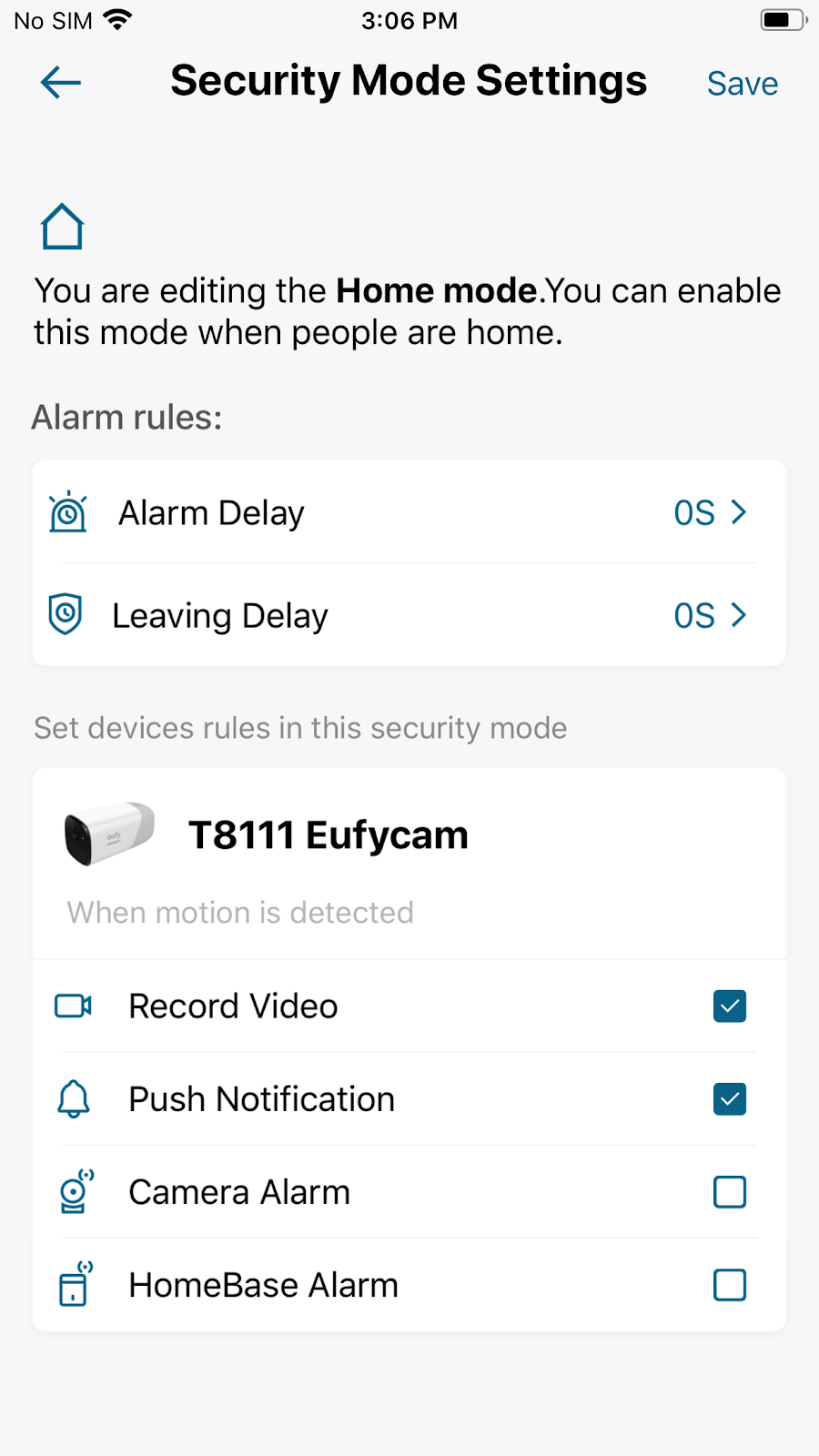
4. Make sure you have enabled the camera record under Home security mode.
Steps: Security (at the lower right corner of main page) > Home > Security Mode Settings > Enable Record Video.
5. Turn up the sensitivity level.
Steps: Slide the side menu> My devices > Camera/Doorbell Name > Camera/Doorbell Settings > Motion detection > Turn up the sensitivity level.
If you still have questions, please contact us for further assistance.









