Spare Part(s) for eufy RoboVac and HomeVac

For optimal performance, follow the instructions below to clean and maintain your RoboVac regularly. The frequency of cleaning/replacement will depend on your usage habits with your RoboVac.


RoboVac Part

Cleaning Frequency

Replacement Frequency

Filter Elements

-

Every 6 months

(or when they become yellow)

Filter

Once every week

(Twice a week if you have a pet)

Every 6 months or after every 50 rounds of cleaning

Side Brush

Once every month

Every 3-6 months

(or when visibly worn)

Rolling Brush

Once every week

Every 6-12 months

Brush Guard

Once every month

Every 3-6 months

(or when the silicone rubber strip on the brush guard becomes visibly worn)

Rubber Strip

Once every week

Every 6 months

(or when visibly worn)

Washable Mopping cloth

After each use

-

Sensors

Once every month

-

Charging Pins

Once every month

-

Dust collector

After each use

-

Swivel wheel

Once every month

-

Water Tank

After each use

-

Mopping module

After each use

-


*Note: Videos about How to Replace RoboVac Accessories


For optimal performance, follow the instructions below to clean and maintain HomeVac regularly. The cleaning/replacement frequency will depend on your HomeVac usage habits.


HomeVac Part

Cleaning Frequency

Replacement Frequency

Dust collector 

After each use

-

Filter

Once every week (Twice a week if it is very dirty) 

Every 6 months or after every 50 rounds of cleaning


*Notes: 

eufy HomeVac H30 - How to Maintain the Peak Suction
eufy HomeVac H30 - How to Remove and Install the Dustbin
How to Maintain Peak Suction Performance of HomeVac S11 Series
How to Reassemble the Dust Collector of HomeVac S11 Series


Links to eufy accessory page

Or visit eufy official website  -> Appliances -> Accessory 
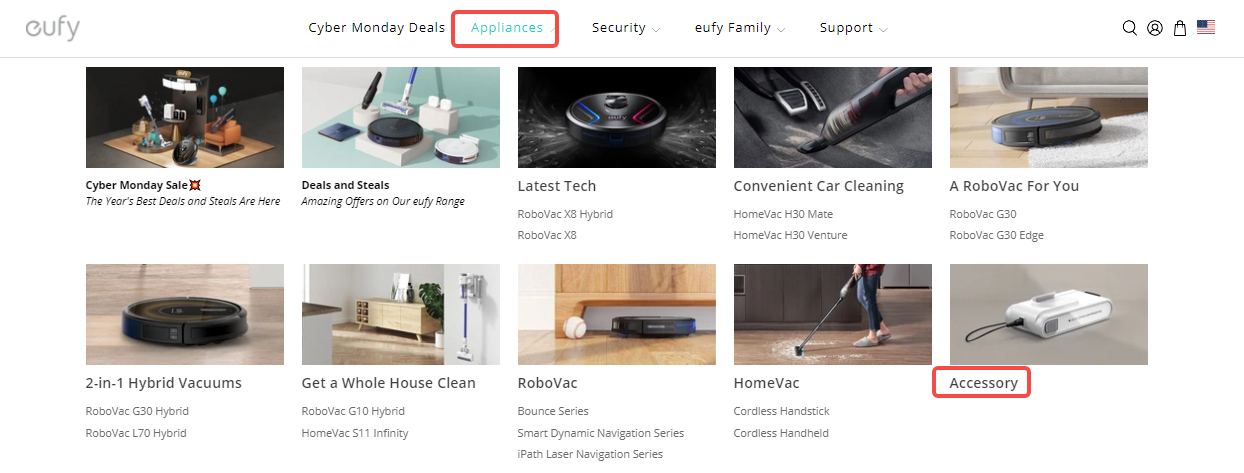
 

  • There are two methods to easily find specific accessories
  1. Input the model number in the Search bar
  2. Select the product series first, then select a specific model.
 

Method 1

Input the model number in the Search bar, then choose your RoboVac, you will see all of the accessories that are compatible with your model. 


Method 2


Select the product series -> choose your model number, you will see all of the accessories that are compatible with your model.


If you cannot find the specific accessory you need, please contact eufy customer support for further information. 

Unresolved icon
455 undefined
What if my RoboVac charges with a red indicator?
29534 views11 likes/2025-04-07 18:06:39
How to factory reset my RoboVac's WiFi?
26759 views1 likes/2025-04-07 18:24:15
What if My RoboVac Stops with Error S1? (for L70/G Series)
15349 views4 likes/2025-04-07 18:23:27
How to connect RoboVac to WiFi? (For Android)
14115 views9 likes/2025-04-07 18:04:53
What does the status light on RoboVac indicate?
20397 views1 likes/2025-04-07 17:40:36
What if my RoboVac runs with a loud noise?
10052 views2 likes/2025-04-07 18:26:09
Download icon
eufy Clean L60 Hybrid دليل المستخدم (T2268)
Download icon
eufy Clean L60 SES Benutzerhandbuch (T2277)
Download icon
eufy Clean L60 Hybrid SES دليل المستخدم (T2278)
Download icon
T2108 EU DOC
Download icon
RoboVac 11c_Manual_EN
Download icon
L60_FR_Manual
View More
Play videoRoboVac X8 Series: How to Replace the Wheels
RoboVac X8 Series: How to Replace the Wheels
Play videoRoboVac X8 Series: How to Replace the Wheels
RoboVac X8 Series: How to Replace the Wheels
Play videoHow to Replace Bumper of RoboVacs
How to Replace Bumper of RoboVacs
Play videoHow to Replace Bumper of RoboVacs
How to Replace Bumper of RoboVacs
Play videoHow to Replace Bumper of RoboVacs
How to Replace Bumper of RoboVacs
Play videoHow to Replace Bumper of RoboVacs
How to Replace Bumper of RoboVacs
View More
Contact Us
Buy on the eufy Store
Download the App
affirmamazonPayamexapplePaydinnersClubdiscovergooglePaymastercardpaypalshopPayvenmovisa
