After successfully connecting the scale to the EufyLife app, you will enter the Home page of the app automatically when you open the app each time. For different models, below is the introduction about how to view the detailed measurement data.
For eufy smart scale (T9140), scale C1 (T9146), and scale P1 (T9147):
Please note only the following measurement data will be displayed on the home screen.
- Measurement data including weight, BMI, and body fat%
- My Goal
- Weight Trend
- Calories
The scale itself would show your weight. To view more detailed measurement data, please tap ">" to check all of your measurement data via the EufyLife app.

For Smart Scale (T9140) and Smart Scale C1 (T9146), data consisting of 12 measurements and the health level of each metric will display on this screen:
WEIGHT, BMI, BODY FAT%, WATER, MUSCLE MASS%, BONE MASS%, BMR, VISCERAL FAT, LEAN BODY MASS, BODY FAT MASS, BONE MASS, and MUSCLE MASS.
For Smart Scale P1(T9147) and Smart Scale A1(T9120), data consisting of 14 measurements and the health level of each metric will display on this screen:
WEIGHT, BMI, BODY FAT%, WATER, MUSCLE MASS%, BONE MASS%, BMR, VISCERAL FAT, LEAN BODY MASS, BODY FAT MASS, BONE MASS, MUSCLE MASS, BODY AGE, and PROTEIN.
By selecting each measurement, you can view your health level according to each specific metric, and there will be a message explaining what this metric means.
For eufy smart scale P2 series and P3 and C20 (T9130):
Please note only the following measurement data will be displayed on the Home screen.
- My Goal
- 3D model
- Measurement data including weight, BMI, body fat% and muscle mass
- Weight Trend(Data Analysis for P3)
- Calories

The scale itself would show your weight. To view more detailed measurement data, please tap ">" to check all of your measurement data via the EufyLife app.
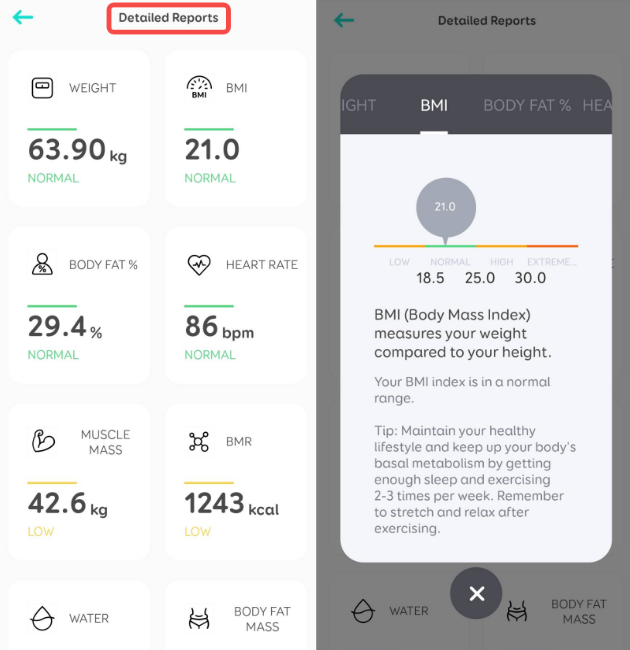
For Smart Scale P2(T9148), data consisting of 15 measurements and the health level of each metric will display on this screen:
Weight, Body Fat, BMI, Muscle Mass, Bone Mass, Water, Protein, BMR, Visceral Fat, Body Fat Mass, Lean Body Mass, Body Age, Body Type, Skeletal Muscle Mass, and Subcutaneous Fat.
For Smart Scale P2 Pro(T9149)and P3(T9150), data consisting of 16 measurements and the health level of each metric will display on this screen:
Weight, Body Fat, Heart Rate, BMI, Muscle Mass, Bone Mass, Water, Protein, BMR, Visceral Fat, Body Fat Mass, Lean Body Mass, Body Age, Body Type, Skeletal Muscle Mass, and Subcutaneous Fat.
By selecting each measurement, you can view your health level according to each specific metric, and there will be a message explaining what this metric means.

If you have any further questions regarding the EufyLife app, please contact us.