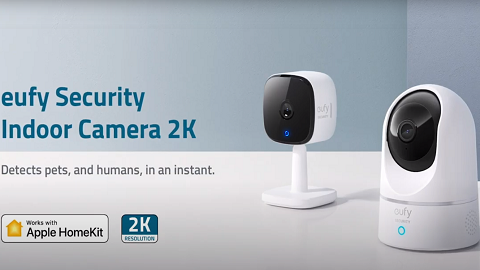
How to Set Up HomeKit on eufy Indoor Cams

HomeKit is only available on 2K indoor cam and 2K indoor cam pan and tilt. This article will guide you to complete the HomeKit Setup on Indoor Cam 2K Series. 


Step 1: Power on your eufy 2K indoor cam or 2K indoor cam pan and tilt.


Step 2: Add the 2K indoor cam or 2K indoor cam pan and tilt to Eufy App by scanning the QR code. Follow the instructions here.


Step 3: After setting up the indoor cam, enable the Homekit feature in the device settings. In Eufy App, you can find the HomeKit Portal option in Camera Settings>General.


Step 4: Follow the instructions on the Eufy App to enable the Homekit feature. For how to add Eufy devices to Home App, Apple support center provides detailed instructions here


Step 5: The device will be sync to the Home App automatically. You are all set!


If you still need help setting up HomeKit, please contact us for further assistance.


Unresolved icon
212 undefined
S380 HomeBase (HomeBase 3) Compatibility
215067 views37 likes/2024-12-25 14:45:40
HomeKit on eufySecurity Devices
153311 views7 likes/2025-04-07 18:37:55
How to View eufySecurity Cameras on a Computer
69314 views10 likes/2025-04-07 18:27:47
Compatibility Between eufySecurity Devices
18292 views1 likes/2025-11-17 15:19:54
What type of microSD card does eufySecurity device use?
49893 views4 likes/2025-04-07 18:27:10
Share Your eufySecurity Devices With Your Family
46704 views6 likes/2025-04-07 18:27:23
Using NAS Storage Step by Step
43794 views1 likes/2025-04-07 18:04:31
Introducing Cloud Backup
30667 views1 likes/2025-04-15 14:12:20
Which eufy cameras work with HomeKit?
214993 views44 likes/2023-01-06 11:49:40
Two-Step Verification for eufySecurity App
49140 views10 likes/2025-04-07 18:27:11
Download icon
Indoor_Cam_2K_manual_us
Download icon
Indoor_Cam_2K_manual_eu
Download icon
Indoor_Cam_1080p_manual_us
Download icon
Indoor_Cam_1080p_manual_eu
Download icon
Indoor_Cam_2K_Pan&Tilt_manual_eu
Download icon
Indoor_Cam_2K_Pan&Tilt_manual_us
View More
Play videoHow to Use NAS to Control eufy Security Products
How to Use NAS to Control eufy Security Products
Play videoHow to Use Geofencing on eufySecurity App
How to Use Geofencing on eufySecurity App
Play videoHow Do I Connect My eufy Cameras with Amazon Alexa
How Do I Connect My eufy Cameras with Amazon Alexa
Play videoHow Do I Connect My eufy Cameras to the Google Assistant App
How Do I Connect My eufy Cameras to the Google Assistant App
Play videoHow to Share Account Access of eufySecurity Devices
How to Share Account Access of eufySecurity Devices
Play videoHow to Schedule Your eufySecurity Devices
How to Schedule Your eufySecurity Devices
View More
Contact Us
Buy on the eufy Store
Download the App
affirmamazonPayamexapplePaydinnersClubdiscovergooglePaymastercardpaypalshopPayvenmovisa