How to Turn Off Motion Sensor When at Home
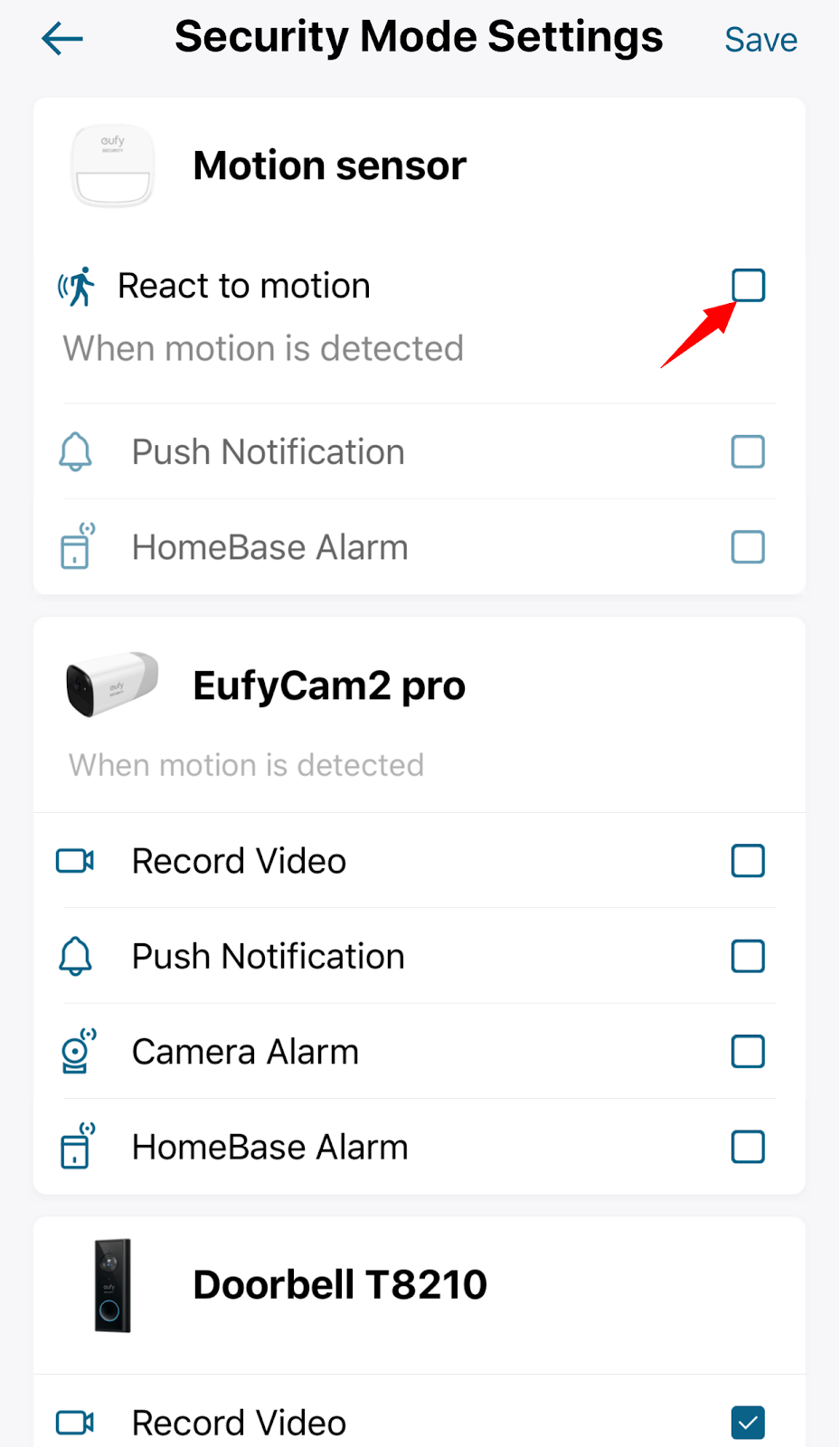
You can choose to ignore the motion sensor in the Security mode settings.
Steps in the app: Security Mode Settings > Disable “React to motion”.
In this case, your system will not respond to any motion that gets detected by the motion sensor, and you will also not receive motion sensor event that is logged in the Events tab.
If you have any questions, please contact us for further assistance.


101 undefined
S380 HomeBase (HomeBase 3) Compatibility 215020 views 37 likes/2024-12-25 14:45:40
Compatibility Between eufySecurity Devices 18289 views 1 likes/2025-11-17 15:19:54
Share Your eufySecurity Devices With Your Family 46701 views 6 likes/2025-04-07 18:27:23
Two-Step Verification for eufySecurity App 49140 views 10 likes/2025-04-07 18:27:11
How to Find Out if You Have 2.4 GHz or 5 GHz WiFi Network 36965 views 1 likes/2025-04-07 18:05:46
How to Change the Wi-Fi Details for eufySecurity Devices 32830 views 3 likes/2025-04-15 15:48:16
Security Modes in eufySecurity App 28715 views 1 likes/2025-04-07 18:05:40
Sign up for A eufySecurity Account 21263 views 1 likes/2025-04-08 13:37:24
Update Firmware for eufySecurity Devices via App 35169 views 5 likes/2024-12-23 20:48:42
Storage Methods Compatibility for eufySecurity Device 36354 views 2 likes/2024-08-22 17:46:20

Motion_Sensor_manual_eu

Motion_Sensor_manual_us

5-Piece_Home_Alarm Kit_manual_us

5-Piece_Home_Alarm Kit_manual_eu


How to Use Geofencing on eufySecurity App


How to Set the Automation Function


Introducing eufy Security Alarm System


How to Share Account Access of eufySecurity Devices


How to Schedule Your eufySecurity Devices


eufy Security App Functions
View More