How to move some of the existing devices to a new Home in the eufy app v4.0?
There are 2 methods to move some of the existing devices to a new Home in the
eufy app v4.0.
1. Create a new Home and then move the existing devices from the existing Home to the new Home.
- Tap “Manage Home” > Add New Home > Name the new Home
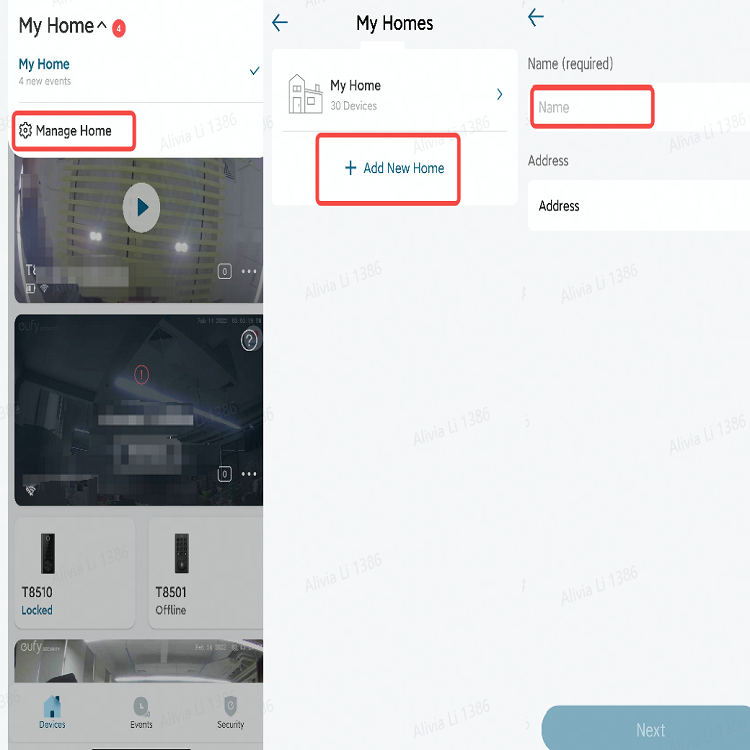
- Tap the existing Home > All Devices > “⇆” icon > choose the new Home

2. Move the existing devices from the existing Home to the new Home directly.
- Tap the existing Home > All Devices > “⇆” icon > Add New Home > Name the new Home > choose the new Home


20 undefined


Is eufy floodlight HomeKit compatible?
Can the Solar Panel be installed on the concrete wall?
Is the eufyCam waterproof after installing the Solar Panels?
Will the Solar Panel charging damage the battery of eufyCam?
Is the Homebase of 2K battery doorbell also the chime?
Fail to Add a Face Profile in Smart Detection for eufyCam/E
What is the maximum distance between the doorbell and the Homebase?

T8210_Video Doorbell 2K (Battery-Powered)_EU_QSG
T8213_Video Doorbell Dual_EU_QSG
T8222_Video Doorbell 1080p_INT_QSG
eufyCam_2_Pro_Set_Manual_us
T8220_Video Doorbell Slim_EN_QSG
SoloCam_L40_manual_eu
View More


How to Mount Your eufyCam E

How to Mount Your eufyCam

eufy Security Video Doorbell 2K (Battery-Powered) Setup Video

How to Install eufy Security Video Doorbell (Wired)

How to Set the Automation Function

How to set up eufy Security Video Doorbell (Battery-Powered)
View More


