Learn About the LED Indicator Light Status on eufy S380 HomeBase (HomeBase 3)

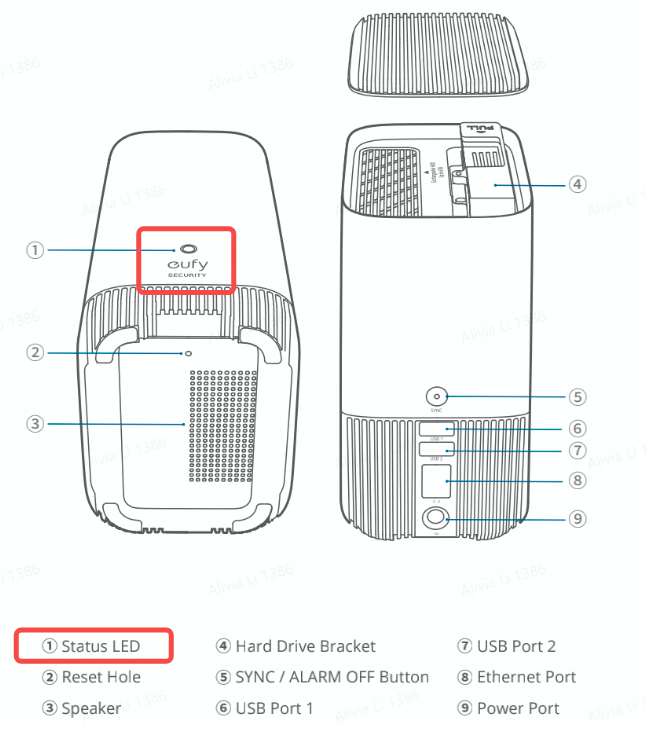
All eufy devices have a LED indicator light that helps determine what state the device is in. Please refer to the following image that shows the location of the HomeBase’s LED indicator light.


HomeBase 3 LED Indicator Light Status and Its Meaning

LED Indicator Light Status

Description

Solid Red

Disconnected from the network

Flashing Red

Booting up or connecting to the network

Solid Blue

Connected to the network successfully

Flashing Blue 

Connected to the network successfully but has not been setup

Flashing Red and Blue alternately

Upgrading firmware


If you still have questions regarding the LED indicator light status on eufy HomeBase 3, please contact us for further assistance.
Unresolved icon
20 undefined
Download icon
eufyCam E330 (Professional) User Guide (T8600)
Download icon
T8160_S330 eufyCam_EU_QSG
Download icon
T8161_S300 eufyCam_EU_QSG
Download icon
T8600_E330 eufyCam_EU_QSG
Download icon
V1_T8160C_QSG_PL
Download icon
T8871_eufyCam S330_EU_QSG
View More
Play video
eufy Security | Edge Ecosystem | Local Security No Monthly Fee
Play video
Get Ready for Next-Gen Security with Edge
Play video
Eufy Security EufyCam 3 Review - Features, Unboxing, Installation, Testing and Edge System Giveaway!
Play video
eufyCam E330 Installation Guide - adjust the angle vertically
Play video
eufyCam E330 Installation Guide - adjust the angle horizontally
Play video
eufy App Functions
View More
Contact Us
Buy on the eufy Store
Download the App
affirmamazonPayamexapplePaydinnersClubdiscovergooglePaymastercardpaypalshopPayvenmovisa