Designed using the iPath Laser Navigation technology, RoboVac L35 series, LR30 series, LR20, X8 series, and L70 Hybrid models are able to build a real-time map of your floors to systematically create an efficient cleaning path. However, the map may occasionally be removed or lost due to the following reasons.
For X8 series, L35 series, LR30 series, and LR20
The difference from the L70 Hybrid is that the X8 series can save up to 5 maps and the L35 series, LR30 series, and LR20 can save 3 maps. Generally, a map is removed when:
- The RoboVac positioning failed.
- The "Multi-map Saving" switch is turned off.
If a map is removed from the eufy Clean app, please try the following troubleshooting steps to verify if the issue can be resolved:
- Turn on the "Multi-map Saving" switch.
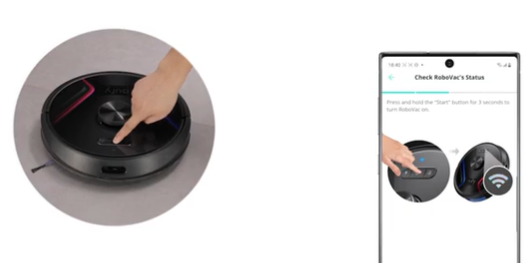
- Restart the RoboVac and try again (Press and hold the start button on the machine for three seconds to turn it off, and then press and hold the start button for three seconds again to turn it on).
- Create a new map.
- If the issue persists, please place the charging base at a new location and start the RoboVac to create a new map.
In order to create a new map, please refer to Tips to Help X8 Quickly Build A Map
and Tips to Help L35 Hybrid/LR30 Hybrid Series/LR20 Quickly Build a Map/Multiple Maps.
In order to turn on the "Multi-map Saving" switch, please refer to the following picture:

For L70 Hybrid:
The RoboVac L70 Hybrid's Mapping feature is designed to store a single map on the RoboVac. Generally, the map is removed when:
- The user deletes the map manually.
- The RoboVac L70 Hybrid is reset.
- The RoboVac L70 Hybrid is removed from the eufy Clean app by the user.
- The RoboVac L70 Hybrid is moved to a new location where the previous map does not match the current layout of the floors.
- The Robovac L70 Hybrid's charging base is moved to a new location away from its previous location.
- The “No-go” or “No-mop” zone has not been added after the RoboVac successfully creates a map. (Please note that at least one "No-go" or "No-mop" zone must be created, or the RoboVac will create a new map every time it starts cleaning.
- The RoboVac is stuck or has triggered an error for more than 10 minutes.
When the map is removed, all zones, all zones (including No-go and No-mop zones) are automatically removed from the eufy Clean app. Once the stored map is removed from the eufy Clean app, there is no way to retrieve it; the RoboVac L70 Hybrid must create a new map and the zones must be set up again by the user using the eufy Clean app.
In order to create a new map, please refer to The Logic of Creating and Saving a Map on RoboVac L70.
In order to set up a new No-go or No-mop zone, please refer to How Do I Create a No-Go Zone / No-Mop Zone for RoboVac L70 Hybrid?
If you have any further questions, please contact us for assistance.