What detection types does S380 HomeBase (HomeBase 3) support?

For the eufyCam 3/3C system, the AI engine is built in S380 HomeBase, which supports Face Detection, Human Detection, Vehicle Detection, and Animal Detection.
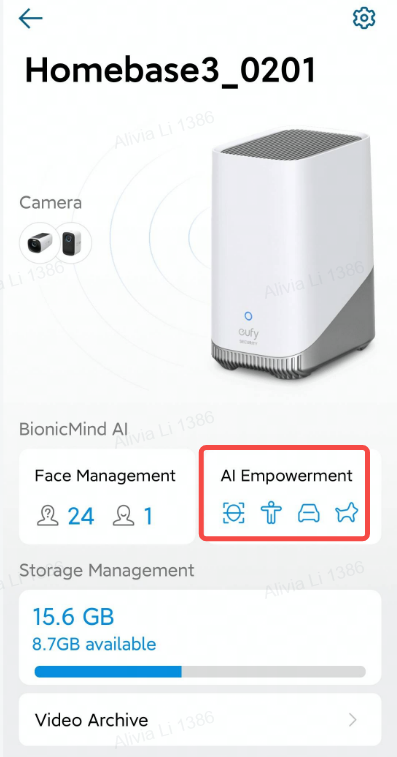


The Face Detection feature can help to recognize the people that showing around the user's house, such as family members, friends, couriers, or others. You can set the Familiar Face and Stranger Face on the Face Management page.

Introducing Face Management Function of S380 HomeBase (HomeBase 3) 


The Human Detection feature can reduce the number of false alarms sent by filtering out events that don't include humans, such as the motions of cars and animals.

Here is an article about How does the Human Detection technology work? 


The Vehicle Detection feature can help to catch up with the user's vehicle in the backyard or driveway. It can only detect the running vehicle to reduce too many detections because of the parking vehicle. 


The Animal Detection feature can detect four-leg animals.


Note: Vehicle Detection and Animal Detection are still in beta mode. If there is any false detection please contact us and donate some recordings to help our team improve the AI feature.

Unresolved icon
108 undefined
S380 HomeBase (HomeBase 3) Compatibility
215093 views37 likes/2024-12-25 14:45:40
Differences Between All eufyCams
14802 views1 likes/2025-11-05 10:27:38
Introducing eufy S380 HomeBase (HomeBase 3)
15081 views1 likes/2025-04-07 18:06:40
What is the S380 HomeBase(HomeBase 3) storage type?
16514 views1 likes/2025-04-07 18:03:13
eufyCams Cannot Be Charged
17076 views1 likes/2025-04-08 13:37:23
S380 HomeBase (HomeBase 3) Goes Offline
14241 views1 likes/2025-04-07 18:03:14
Issues of the Hard Drive in S380 HomeBase (HomeBase 3)
11500 views1 likes/2025-04-07 18:06:16
Download icon
eufyCam_E330 (Professsional)_4-Cam_Kit_QSG_EU
Download icon
eufyCam_E330 (Professsional)_Add_On_QSG_EU
Download icon
T8600 eufyCam E330 (Professional) EU Declaration of Conformity
Download icon
eufyCam E330 (Professional) User Guide (T8600)
Download icon
V1_T8160C_QSG_CS
Download icon
V1_T8160C_QSG_FI
View More
Play videoeufyCam E330 Installation Guide - adjust the angle vertically
eufyCam E330 Installation Guide - adjust the angle vertically
Play videoeufyCam E330 Installation Guide - adjust the angle horizontally
eufyCam E330 Installation Guide - adjust the angle horizontally
Play videoHow to Schedule Your eufySecurity Devices
How to Schedule Your eufySecurity Devices
Play videoeufy Security App Functions
eufy Security App Functions
Play videoHow to Turn On / Off the Snooze Feature
How to Turn On / Off the Snooze Feature
Play videoHow to Schedule Your eufySecurity Devices
How to Schedule Your eufySecurity Devices
View More
Contact Us
Buy on the eufy Store
Download the App
affirmamazonPayamexapplePaydinnersClubdiscovergooglePaymastercardpaypalshopPayvenmovisa