What is the mop drying function of the X9 Pro?

A damp mop can be a breeding ground for bacteria, which can cause unpleasant odors in your home. After using the mopping function, it is important to dry the mops properly.


The X9 Pro cleans and dries the mops after it finishes a cleaning cycle and docks on the Auto-Clean station. The drying time can be set in the eufy Clean App. There are currently three settings: 2/3/4 hours. The default drying time is 3 hours.


Please click Settings > Base Station Settings > Drying Duration, and then select the drying time according to your preference.
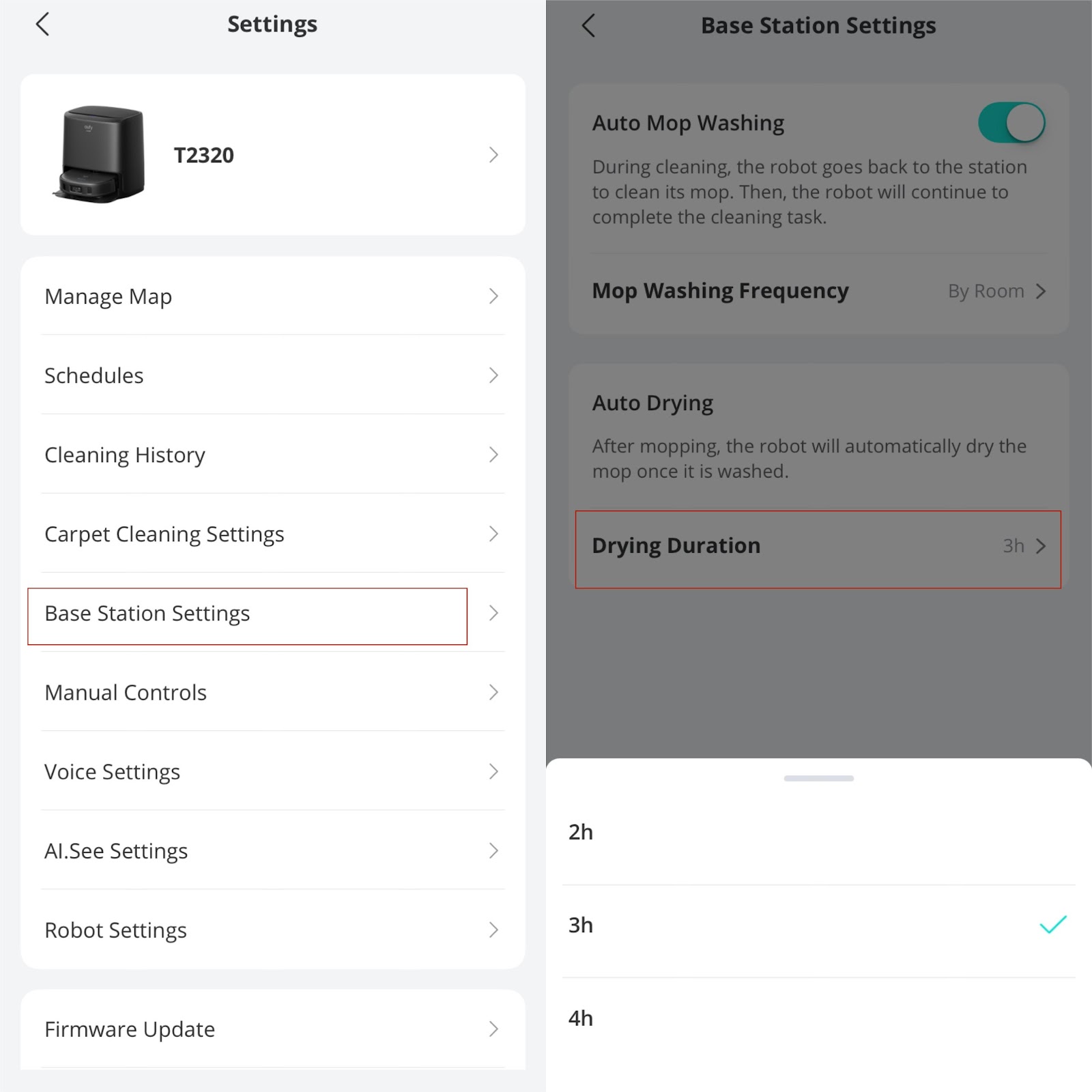
 

The time it takes for mops to be completely dried varies depending on environmental factors such as the humidity and temperature of the room and the moisture content of the mops. Therefore, it is recommended to adjust the drying time according to the indoor temperature.


You can manually let the device dry the mops via the eufy Clean app if necessary. Please note that this feature is only available when the device is on the Auto-Clean Station.


You will hear a slight running sound while drying the mop, and the app will display the icon as shown in the picture:


The noise level while drying the mops is relatively low. The low noise level also makes it possible to dry the mops at night without disturbing your sleep.


The power consumption of drying the mops is relatively minimal. The maximum power consumption at one time is less than 0.2 kWh. This means that the drying process is energy-efficient and will not significantly increase your electricity bill.


If you have any further questions or concerns, please don't hesitate to contact us for assistance.

Unresolved icon
86 undefined
What should I do if my RoboVac is offline?
14474 views1 likes/2025-04-07 18:06:39
Using your RoboVac with Amazon Alexa
11832 views2 likes/2025-05-16 11:15:17
How to contact a Human Customer Service Representative?
22212 views1 likes/2024-11-27 10:43:42
Can I change the registration email address of eufy app?
10911 views13 likes/2025-05-16 11:19:43
How to delete your eufy Clean account?
9031 views1 likes/2024-10-08 15:16:31
🤝How Your eufy Warranty Service Works
20825 views1 likes/2025-11-07 12:15:33
How to update RoboVac's firmware?
14388 views2 likes/2024-10-08 15:19:22
Using your RoboVac with Google Assistant
8673 views1 likes/2025-05-16 11:16:42
Download icon
T2320 UKCA&EU DOC
Download icon
X9 Pro_EN+DE+FR+NL+IT+ES+TR_Manual
Download icon
X9 Pro_EN+DE+FR+NL+IT+ES+TR_Quick Start Guide
Download icon
X9 Pro_JP_Safety Sheet
Download icon
X9 Pro_EN+KR+AR_Safety Sheet
Download icon
X9 Pro_EN+DE+FR+NL+IT+ES+TR_Safety Sheet
View More
Play videoeufy Clean X9 Pro Series Cleaning and Maintenance
eufy Clean X9 Pro Series Cleaning and Maintenance
Play videoeufy Clean X9 Pro with Auto-Clean Station Unboxing and Quick Start Guide Video
eufy Clean X9 Pro with Auto-Clean Station Unboxing and Quick Start Guide Video
Play videoHow to Control X9 Pro Series via eufy Clean App
How to Control X9 Pro Series via eufy Clean App
Play videoHow to Connect X9 Pro Series to Wi-Fi
How to Connect X9 Pro Series to Wi-Fi
Play videoHow to Replace the Battery in X9 Pro Series
How to Replace the Battery in X9 Pro Series
Contact Us
Buy on the eufy Store
Download the App
affirmamazonPayamexapplePaydinnersClubdiscovergooglePaymastercardpaypalshopPayvenmovisa
