What should I do if my X9 Pro usually stops with Error 4?
What Caused Voice Alert: Error 4?
This error is triggered when RoboVac’s rolling brush is stuck. This could be caused by the roller brush getting tangled up or stuck by hair or other objects on the floor, resulting in the roller brush being unable to spin freely.
How Do I Fix Voice Alert: Error 4?
If you have long hair or pets with long hair, you may encounter issues with the roller brush getting tangled up with your hair. It is important to note that the default suction setting for X9 Pro is standard mode. However, if you switch to Max mode, the issue of hair getting tangled up in the roller brush will be greatly reduced.
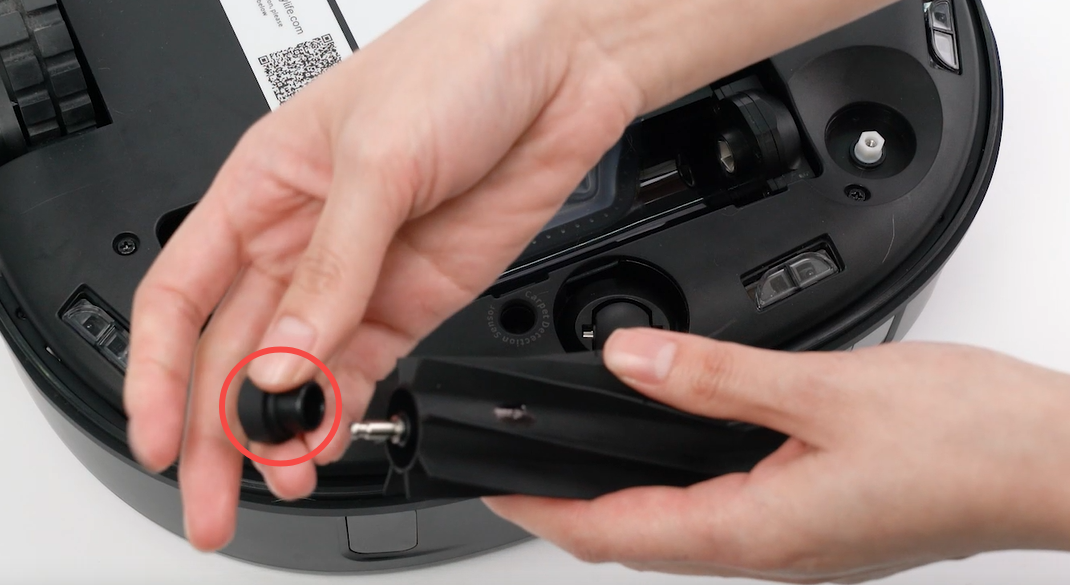
Also, we recommend regularly cleaning the roller brush and removing any hair or debris that may have accumulated. To do this, simply remove the brush guard and roller brush from the robot and use a pair of scissors to remove any hair or debris that may be stuck in the bristles. Please also remember to clean the roller joints(you can refer to the picture below to remove one end of the roller brush), joints in the vacuum, and suction inlet. Once all the parts have been cleaned, place the items back into the device and restart again.
If cleaning did not help, please run the vacuum on hard floors without the roller brush and brush guard to verify whether the error persists when the vacuum is running without both parts.
If the vacuum runs fine without both the roller brush and brush guard installed, then the problem is most certainly caused by the rolling brush and brush guard, and you can double-clean these parts or replace the parts to resolve the issue.
If the error persists when running the RoboVac without the roller brush and brush guard installed, the issue should be with the roller brush motor. Please contactus for further assistance.