What to do if my Scale displays "OL", "Lo", "Err"?

When the scale displays "OL", "Lo", or "Err", there might be something wrong with it. Each error message indicates different issues, please check the error messages below.

Error Display

Description

Solution

OL

Overload. The device will power off

Stop using this scale for measurement.

Lo

Low battery. The device will power off.

Replace all batteries at the same time.

Err(for Smart Scale(T9140), Smart Scale C1(T9146) and Smart Scale P1(T9147)

Measurement failure. 

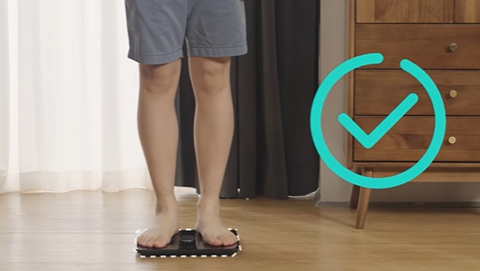
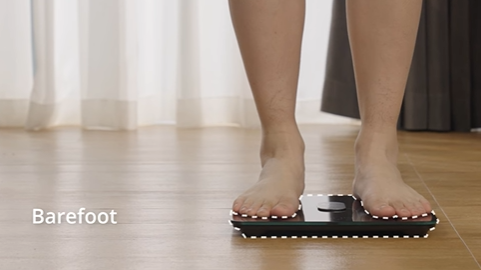
1. Step barefoot and keep full contact with the electrodes. 

2. Stand still until the measurement on the LED display locks.

FAIL(for P2 series and P3 only)

Wi-Fi setup failure.

Open the Eufy app and complete the settings via "eufy Care device tab -> more icon -> Settings" .

• Move the scale to a place near

your router before the Wi-Fi

setup.

• Press and hold the UNIT

button for 10 seconds to

restore factory settings, then

restart the Wi-Fi connection. 


"OL" or "Err"

Our scale can weigh from 11lbs to 397lbs(P2 series weight from 0.2lbs-397lbs). If you are actually within the weight range, but get the "OL" or "Err" display, please try the following tips and see whether they help.


1. Reinstall/Replace batteries, and turn the scale on, wait until " 0.0" is displayed before measuring to calibrate.

2. Make sure the scale is on a hard and flat surface.

3. Step on the center of the platform barefoot and stand still until the measurement finishes.

4. Test a lighter object and check if it still displays "OL" or "Err".


 "Lo"

The "Lo" stands for low battery. If your scale displays this error, please replace the batteries inside the smart scale. Then turn the scale on, and wait until " 0.0" is displayed before measuring to calibrate.


"Fail"

If you failed to connect your scale to WiFi, please refer to the following FAQ for further troubleshooting.

What should I do if the WiFi connection shows "FAIL"?


If the problem remains, please email eufy support.

Unresolved icon
79 undefined
Download icon
Smart Scale P3_EN+AR_Manual
Download icon
Smart Scale P3_EU_Manual
Download icon
Smart Scale P3 User Guide (T9150)
Download icon
【T9150】Smart Scale P3 EU Declaration
Download icon
Smart Scale(T9140)_EU_Manual
Download icon
T9140 EU DOC
View More
Play videoEufy BodySense Smart Scale
Eufy BodySense Smart Scale
Play videoeufy Smart Scale P2 Series: How to Troubleshoot Inaccurate Body Measurements
eufy Smart Scale P2 Series: How to Troubleshoot Inaccurate Body Measurements
Play videoeufy Smart Scale P2 Series: How to Troubleshoot Inaccurate Weight Measurements
eufy Smart Scale P2 Series: How to Troubleshoot Inaccurate Weight Measurements
Play videoeufy Smart Scale P2 Series Unboxing Video
eufy Smart Scale P2 Series Unboxing Video
Play videoeufy Smart Scale P2 Series: How to Connect iOS Devices
eufy Smart Scale P2 Series: How to Connect iOS Devices
Play videoeufy Smart Scale P2 Series: How to Connect Android Devices
eufy Smart Scale P2 Series: How to Connect Android Devices
View More
Contact Us
Buy on the eufy Store
Download the App
affirmamazonPayamexapplePaydinnersClubdiscovergooglePaymastercardpaypalshopPayvenmovisa