Please ensure that you downloaded and installed the eufy Clean app on your phone. You can download the eufy Clean app from Google Play.
Before starting the setup process, please ensure the following:
- Your phone is connected to a 2.4Ghz WiFi and you know the WiFi password.
- Ensure that you enabled the location service for eufy Clean. On your phone, go to Settings -> Security & Privacy -> Location -> eufy Clean -> Allow only while using the app.

Now we can set up the RoboVac on the eufy Clean app.
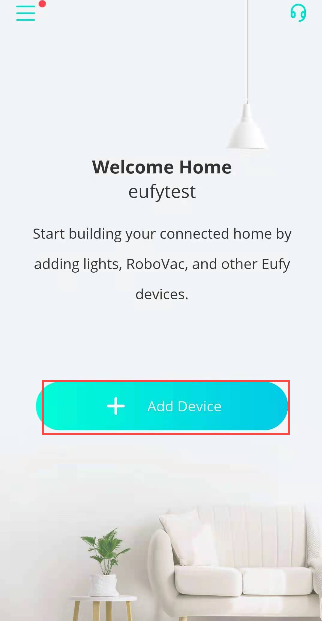
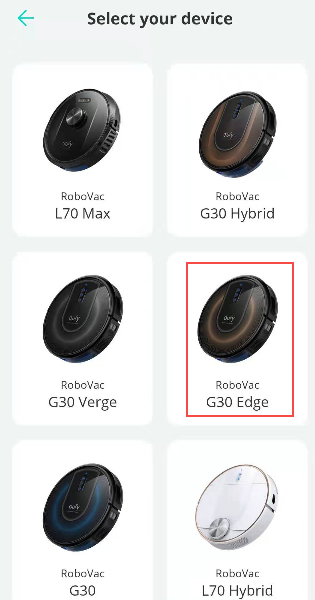
Step 1. Tap “Add Device” -> “Robotic Vacuums” and select the model of your RoboVac, here we take G30 Edge as an example.

Step 2, Type the WiFi password in. Note that the case is sensitive, you can tap the “eye icon” to show the password and double confirm that the correct password is typed in. Confirm that the WiFi indicator light is flashing slowly, then you can tap “status confirmed” and go to Next. If the WiFi light is not flashing slowly, please reset the WiFi and try again.


Step 3. On the eufy Clean app, tap “Go to Wi-Fi Settings” and Connect your phone to RoboVac’s WiFi “RoboVac G30 Edge xxx”.


Step 4. Go back to the eufy Clean app and wait for the WiFi connection to be completed. If you see a message saying “RoboVac WiFi has poor quality” or “No internet connection”, and ask if you would like to switch WiFi, please choose “Cancel” and wait for the next step.

Step 5, Personalize your vacuum by giving it a nickname. After the WiFi is connected, you can rename the RoboVac. Then you are set!


If you failed to connect your RoboVac to WiFi, please refer to the following FAQ for further troubleshooting.
General troubleshooting when RoboVacs do not connect to WiFi
If you need further assistance, please contact us.


