If you have recently replaced your WiFi router, signed up with a new Internet service provider, or have your current WiFi credentials changed, please set up your eufy RoboVac again as a new device since it is unable to automatically switch WiFi network connection from an existing network to a new network. In order to connect your RoboVac to a new WiFi network after it has already been set up, please follow the steps below.
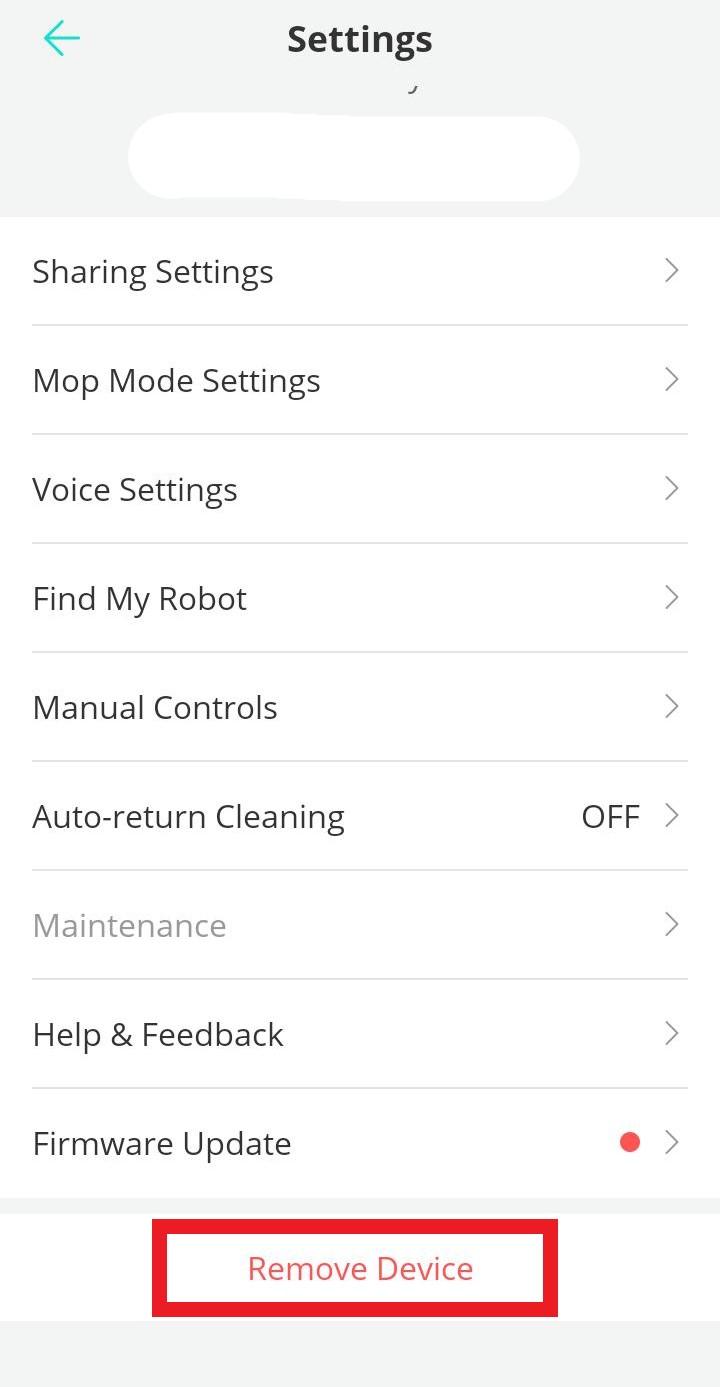
Note: Before setting up your RoboVac on the new WiFi network, it is recommended to first remove the RoboVac from the eufy Clean app. Please launch the eufy Clean app > tap the RoboVac icon on the main screen > tap the gear wheel icon at the top right corner > scroll down to the bottom of the screen and select Remove Device.
Step 1
In order to factory reset your RoboVac’s WiFi, simply follow the instruction below based on your RoboVac model.
- Bounce series: Press and hold the “power” button on the RoboVac for approximately 10 seconds until you hear a beeping sound.
- Dynamic series: Press and hold the “play/pause” button on the RoboVac for 10 seconds until you hear a voice prompt.
- iPath series L70 Hybrid model: Press and hold the “power” and the “charger” buttons simultaneously for three seconds until you hear a voice prompt.
- iPath series X8/X8 Hybrid model: Press and hold the “charger” and the “square” buttons simultaneously for five seconds until you hear a voice prompt.
Note: Visit How to factory reset my RoboVac's WiFi? for detailed instructions.
Step 2
Set up your RoboVac as a new device by connecting it to the new WiFi network, and follow the instructions on each page in the eufy Clean app to set up the WiFi connection again. During the setup process, please input the new 2.4GHz WiFi network and the new WiFi password. Please visit the following video links according to the operating system of your smartphone or tablet.
Note: eufy RoboVac connects to a 2.4GHz WiFi network and it cannot be connected to a 5.0GHz WiFi network.
If you have further questions regarding how to connect your RoboVac to a new WiFi network, please contact us for assistance.