How to charge my RoboVac when used for the first time?
  • RoboVac has a pre-installed rechargeable battery that has to be fully charged before use. 
  • RoboVac returns to the Charging Base at the end of a cleaning cycle or when its battery is running low.
 

There are two methods to charge the RoboVac. 


Method 1


1. Attach RoboVac to the Charging Base by aligning its charging pins with the charging pins on the base;
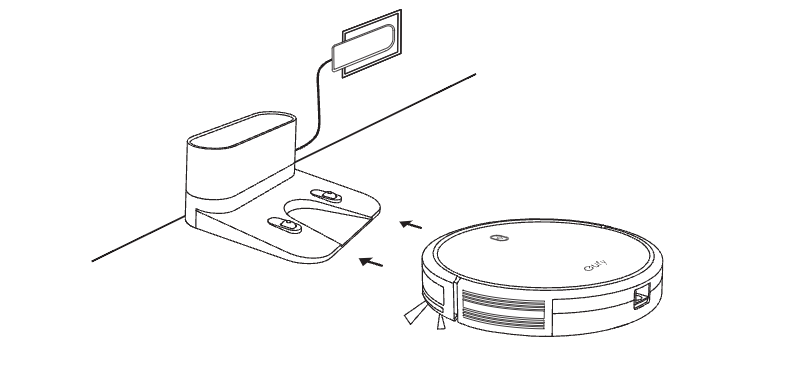

2. Fully connect the charging cable and the charging base to make sure the LED indicator on the charging base is solid white;

3. Make sure the breathing orange indicator on RoboVac lights up when you charge it, and then fully charge it until the indicator turns into solid blue.


Methods 2
 

Pree on the remote control to return RoboVac to the Charging Base. 


For RoboVac LR20/LR30/ L35 series, please click the article below:

https://support.eufylife.com/s/article/Charging-related-support-article-for-RoboVac-LR30-L35-series


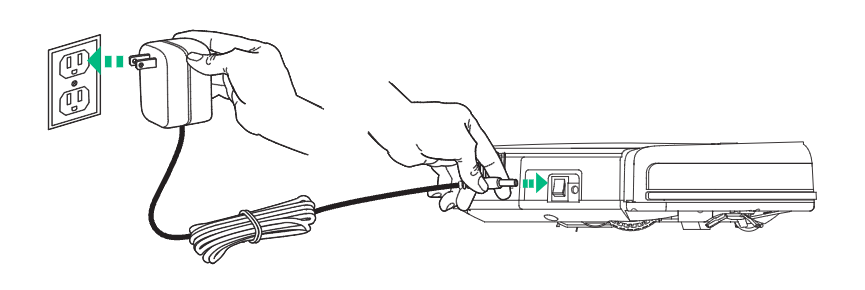
If your RoboVac (like RoboVac 11) also supports the AC adapter charging method, you can charge RoboVac directly by plugging the round connector of the adapter into the charging socket on RoboVac and the other end into a wall outlet.

If you need further assistance, please email us.

How to charge my RoboVac when used for the first time?
344 undefined
What if my RoboVac charges with a red indicator?
21201 views/9 likes/2025-04-07 18:06:39
How to factory reset my RoboVac's WiFi?
19747 views/1 likes/2025-04-07 18:24:15
What if My RoboVac Stops with Error S1? (for L70/G Series)
10978 views/4 likes/2025-04-07 18:23:27
How to connect RoboVac to WiFi? (For Android)
9182 views/9 likes/2025-04-07 18:04:53
What does the status light on RoboVac indicate?
14155 views/1 likes/2025-04-07 17:40:36
What if my RoboVac runs with a loud noise?
6396 views/2 likes/2025-04-07 18:26:09
‬⁡‌​⁢‬⁣‬‌⁢⁣‌⁣⁢⁢​⁤​⁣‬‬​‌​​⁣‌⁡‍‬​‬‍⁢⁤‍⁣​‍‌​‬⁢【T8010】【HomeBase 2】EU Declaration
T8113S_EU Declaration of Conformity
eufyCam_2C_Pro_Set_Manual_us
RoboVac 30C_Manual_EN
video_Doorbell_2K_(Wired)_Manual_us
Motion_Sensor_manual_us
View More
How to Connect RoboVac to iOS Devices
eufy 3-in-1 E20: Unboxing and Quick Start Guide Video
How to Install eufy Security Video Doorbell (Wired)
How to set up eufy Security Video Doorbell (Battery-Powered)
How to Install eufy Security Floodlight Camera
eufy Security App Functions
View More




