*This article is not suitable for the X8 series RoboVac. If your RoboVac is X8 series, please refer to How to connect RoboVac X8/X8 Hybrid to WiFi (iOS)?
Please ensure that you have downloaded and installed the eufy Clean app on your iPhone. You can download the eufy Clean app from the App Store. The eufy Clean app works with iOS 9.0 and above.
Before starting the setup process, please ensure the following:
- Your iPhone is connected to a 2.4Ghz WiFi and you know the WiFi password.
- Ensure that you enabled the location service for eufy Clean. On your iPhone, go to Settings -> Privacy -> Location Services -> eufy Clean -> While Using the App. And enable Precise Location.

Now we can set up the RoboVac on the eufy Clean app.
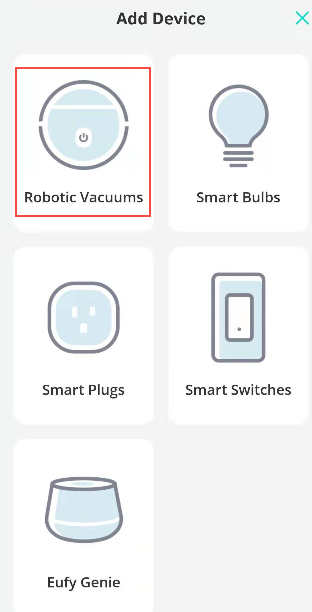
Step 1. Tap “Add Device” -> “Robotic Vacuums” and select the model of your RoboVac, here we take G30 Edge as an example.


If you see the following asking, please select “Allow While Using App”.

Step 2, put the WiFi password in. Note that the case is sensitive, you can tap the “eye icon” to show the password and double confirm that the correct password is typed in. Confirm that the WiFi indicator light is flashing slowly, then you can tap “Status Confirmed” and go to Next. If the WiFi light is not flashing slowly, please reset the WiFi and try again.

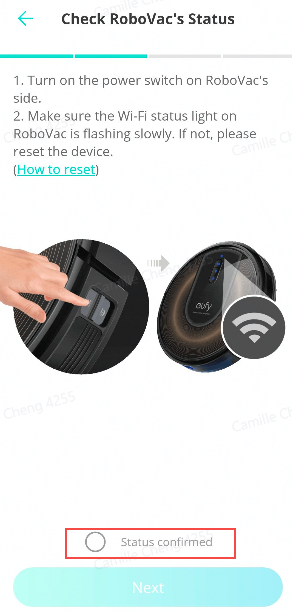
Step 3. Connect your phone to RoboVac’s WiFi “RoboVac G30 Edge xxx”. After tapping on “Status Confirmed” in step 2, the EufyHome app will direct to the WiFi list of your phone, select RoboVac’s WiFi and connect to it.

Step 4. Go back to the eufy Clean app and wait for the WiFi connection to be completed.

Step 5, Personalize your vacuum by giving it a nickname. After the WiFi is connected, you can rename the RoboVac. Then you are set!


If you failed to connect your RoboVac to WiFi, please refer to the following FAQ for further troubleshooting.
General troubleshooting when RoboVacs do not connect to WiFi
If you need further assistance, please contact us.