How to delete your eufy Clean account?
Here are the instructions on how to delete your account/data:
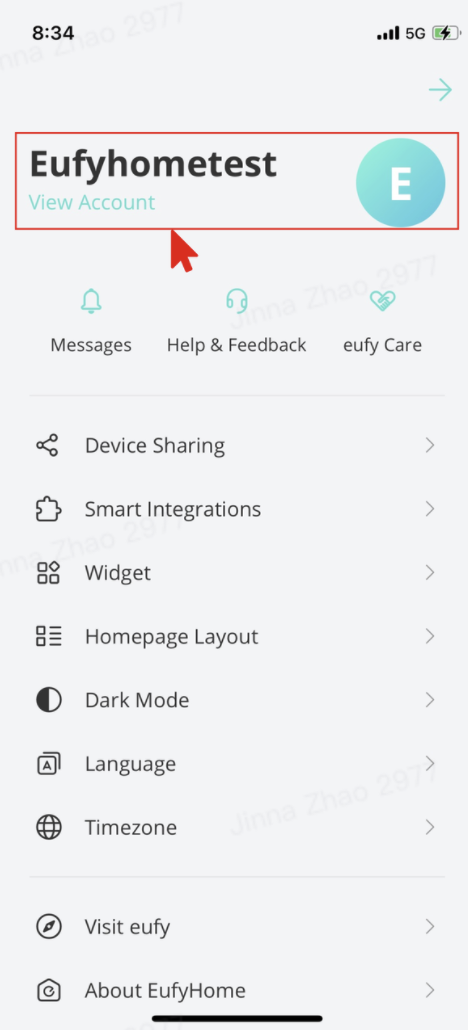
1. Click the top-left icon to open the side menu.
2. Click "View Account" to enter the account settings.

3. Click "Delete Account"
4. Please read the message carefully before clicking "Delete".

5. If you select "Yes", then:
6. After the account is deleted, you will not be able to reactivate, restore any data, or regain access. If you want to use eufy Clean again, you need to create a new account.
1. Click the top-left icon to open the side menu.
2. Click "View Account" to enter the account settings.
3. Click "Delete Account"
4. Please read the message carefully before clicking "Delete".
5. If you select "Yes", then:
- Your account information will be deleted immediately.
- All devices which are connected to this account will be disconnected and reset.
- All devices' information will be deleted from the server immediately.
- If subscribed to eufy's newsletter, you will be unsubscribed.
6. After the account is deleted, you will not be able to reactivate, restore any data, or regain access. If you want to use eufy Clean again, you need to create a new account.

454 undefined

eufy Omni C20 Guide de l'utilisateur (T2280)

eufy Clean L60 Hybrid دليل المستخدم (T2268)

eufy Clean L60 SES Benutzerhandbuch (T2277)

eufy Clean L60 Hybrid SES دليل المستخدم (T2278)

T2108 EU DOC

RoboVac 11c_Manual_EN
View More


RoboVac X8 Series: How to Replace the Wheels


RoboVac X8 Series: How to Replace the Wheels


How to Replace Bumper of RoboVacs


How to Replace Bumper of RoboVacs


How to Replace Bumper of RoboVacs


How to Replace Bumper of RoboVacs
View More






