|
Voice Prompt
|
Cause & Quick Solution
|
Link to detailed troubleshooting
|
|
Error 1: Front bumper stuck
|
Front bumper is stuck. Tap it repeatedly to remove any dust;if not, then move the device to a new position and try again.
|
What if my G series RoboVac stops with Error 1
|
|
Error 2: Wheel stuck. Check the wheel and move it to a new position
|
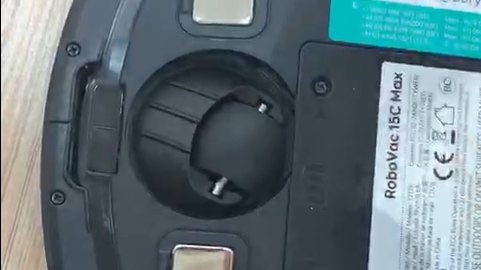
Wheel may be stuck or trapped. Clear any obstacles in the surrounding area and check the wheel for any trapped dust. Move the device to a new position and try again.
|
What if my G series RoboVac stops with Error 2
|
|
Error 3: Side brush stuck
|
Side brush may be stuck. Please clean it and try again.
|
What if my G series RoboVac stops with Error 3
|
|
Error 4: Rolling brush stuck. Remove and clean the rolling brush
|
Remove the rolling brush, roller joint, roller brush cover, and suction inlet to clean it. Once cleaned, place the items back into the device and try again.
|
What if my G series RoboVac stops with Error 4
|
|
Error 5: Device trapped. Clear the surrounding area
|
Device is trapped. Clear any obstacles in the surrounding area and try again.
|
What if my G series RoboVac stops with Error 5
|
|
Error 6: Device trapped. Place the device near the position where the problem occurred.
|
Device may be suspended in air. Move it to a new position close to the original position and try again. If the device is still unable to start, clean the edge sensor and try again.
|
What should I do if my G series RoboVac stops with Error 6
|
|
Error 7: Wheel suspended. Please move the device to a new position
|
Wheels may be suspended in air. Move the device to a flat surface and a new position close to the original position then try again.
|
What if my G series RoboVac stops with Error 7
|
|
Error 8: Low battery, shutting down device. Please charge your device
|
Low Battery; system will shut down. Charge the device and try again.
|
What if my G series RoboVac stops with Error 8
|
|
Error 9: Magnetic Boundary Strip detected. Move device to a different area (only for G30 Edge/Verge with boundary strips)
|
Device is too close to a strong magnetic field or strip. Move the device to a different area and try again.
|
/
|
|
Error 10: Path Tracking Sensor needs cleaning
|
Path tracking sensor is blocked by dust and requires cleaning.
|
/
|
|
Error 21: Auto-Empty Station blocked by surrounding obstacles
|
Auto-Empty Station is blocked by obstacles, clear any obstacles around the auto-empty station and try again.
|
What Should I Do if My RoboVac Stops with Error 21? (for L70/G/G+ series)
|
|
Error 22: The device is being picked up. Please put the machine back near the starting place.
|
The device is being picked up. Please put the machine back near the starting place.
|
/
|
|
Error S1: Battery Error. Refer to Owner's Manual or App for help
|
- Unplug the adapter on both ends, re-connect the adapter to the charging base, then the other end to a different wall outlet. Confirm the power indicator on the charging base lights up.
- Clean the pins on the charging base and on the bottom of the vacuum with a dry clean cloth.
- Put the RoboVac right in front of / facing the charging base within 6 feet and press the home button to tell it to return. Let it dock on its own. This is to make sure the charging pins are connected properly.
- If the issue persists, contact customer support for help.
|
What if my G series RoboVac stops with Error S1
|
|
Error S2: Wheel Module Error. Refer to Owner's Manual or App for help
|
- Check whether the wheels are stuck or dust is trapped inside before restarting the device- If the issue persists, contact customer support for help
|
What if my G series RoboVac stops with Error S2
|
|
Error S3: Side Brush Error. Refer to Owner's Manual or App for help
|
- Check whether the side brush is stuck in an unknown object before restarting the device- If the issue persists, contact customer support for help
|
What if my G series RoboVac stops with Error S3
|
|
Error S4: Suction Fan Error. Refer to Owner's Manual or App for help
|
- Check whether the fan blades are stuck in an unknown object before restarting the device- Clean the dust collector and filter before restarting the device- If the issue persists, contact customer support for help
|
What if my G series RoboVac stops with Error S4
|
|
Error S5: Rolling Brush Error. Refer to Owner's Manual or App for help
|
- Remove and clean the roller brush, roller brush connection, roller brush cover, and suction inletbefore restarting the device- If the issue persists, contact customer support for help
|
What if my G series RoboVac stops with Error S5
|