How does the Auto-return Cleaning feature work on eufy RoboVac?
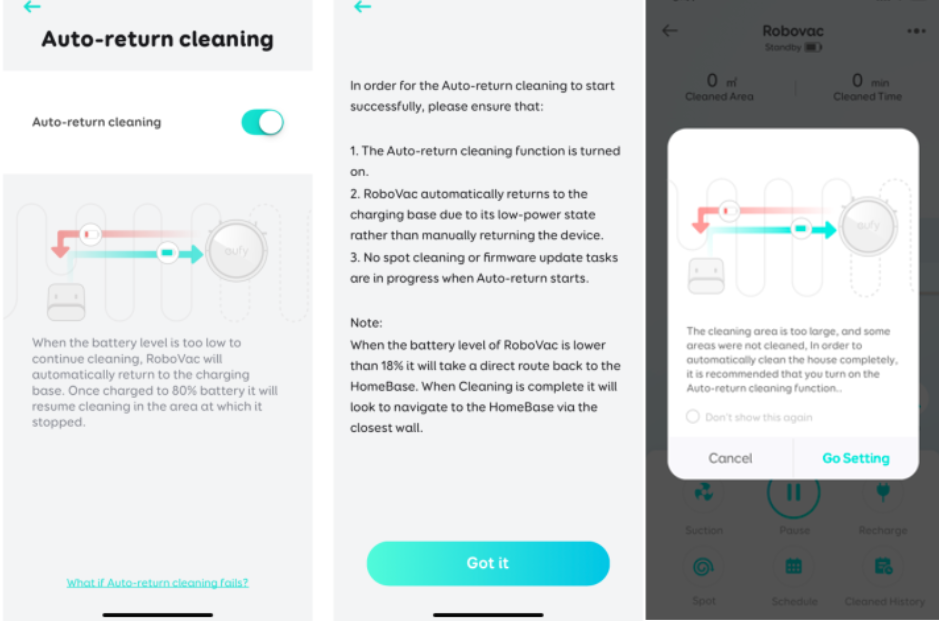
When the Auto-return Cleaning feature is enabled, RoboVac will automatically return to the charging base when the battery level is too low to continue cleaning. Once the battery is charged to 80%, RoboVac will automatically resume cleaning at the same spot where it initially left off.
For L35 Hybrid+ and LR30 Hybrid+: When the Auto-return Cleaning feature is enabled, and the RoboVac automatically returns to the auto empty station due to low battery, the RoboVac will self-empty first before recharging. If the mopping module is attached to the RoboVac when the RoboVac returns to the auto empty station, it will charge itself automatically. Once the battery is charged to 80%, RoboVac will automatically resume cleaning at the same spot where it initially left off.

Note:
The Auto-return cleaning feature enables RoboVac to automatically return to where it initially left off to continue cleaning for another cleaning cycle until the battery is low. Once RoboVac returns to the charging base to charge, it will not automatically resume cleaning for the third time after the battery is fully charged.
Which eufy RoboVac models support the Auto-return Cleaning feature?
Currently, the Auto-return Cleaning feature is supported on eufy RoboVac G, L, and X series models. Please refer to the following list for a complete list of RoboVac models.
Note: For the L and X series, the Auto-return Cleaning feature is only applicable in Auto clean mode. For the L70 series, there is no "Auto-return Cleaning" switch in the eufy Clean app, but the firmware of the machine itself directly supports the Auto-return Cleaning feature.
- G Series: G10 Hybrid / G20 / G20 Hybrid / G30 / G30 Edge / G30 Verge / G30 Hybrid/G32 Pro/G40/G40 Hybrid/G35+/G40+/G40 Hybrid+.
- L Series: L70 Hybrid/L70 Max/LR20/LR30 Hybrid / LR30 Hybrid+ / L35 Hybrid / L35 Hybrid+/L50/L50 SES/L60 Hybrid/L60 Hybrid SES/L60/L60 SES
- X Series: X8 / X8 Hybrid.
How do I enable the Auto-return Cleaning feature in the eufy Clean app?
Please launch the eufy Clean app > tap the RoboVac icon > tap the gear wheel icon (or the three dots) at the upper right corner > select Auto-return Cleaning > tap the toggle switch to either enable or disable the Auto-return Cleaning feature.
What can I do if Auto-return Cleaning fails to work?
If Auto-return Cleaning fails to work, please verify the following conditions are met.
- The Auto-return Cleaning feature has been enabled.
- Allow RoboVac to automatically return to the charging base due to its low-battery state rather than manually moving the device to its charging base.
- No other cleaning mode, such as spot cleaning, is in progress when Auto-return Cleaning begins.
- RoboVac is not in the process of updating its firmware.
If you have further questions regarding the Auto-return Cleaning feature on eufy RoboVac, please contact us for assistance.







