What to do if my G series RoboVac does not return to the charging station?

Before troubleshooting, please read the following article:

In what kind of situations will G series RoboVac may fail to dock?


To troubleshoot, please refer to the following steps:

  • Confirm whether you have a large carpet or a carpeted room in your house.
  • Make sure the charging base is placed on a hard and flat surface rather than on a rug or carpet.
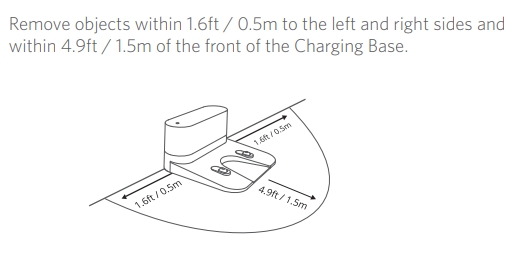
  • Make sure to install the charging base at a location that is easily accessible and against a wall. Clear any obstacles within the range described in the image below.


If the issue persists, please email eufy support for further assistance. Make sure to turn on the "Activity Log Upload" function on the settings of the eufy Clean app (https://support.eufylife.com/s/article/What-s-the-Log-Upload-feature-in-the-Eufyhome-App ) and run the RoboVac so we can learn more information from your log.
Unresolved icon
214 undefined
What if my RoboVac charges with a red indicator?
29565 views11 likes/2025-04-07 18:06:39
How to factory reset my RoboVac's WiFi?
26787 views1 likes/2025-04-07 18:24:15
What if My RoboVac Stops with Error S1? (for L70/G Series)
15372 views4 likes/2025-04-07 18:23:27
How to connect RoboVac to WiFi? (For Android)
14128 views9 likes/2025-04-07 18:04:53
What does the status light on RoboVac indicate?
20413 views1 likes/2025-04-07 17:40:36
What if my RoboVac runs with a loud noise?
10070 views2 likes/2025-04-07 18:26:09
eufy Warranty Policy
19850 views1 likes/2024-11-27 10:27:18
How to connect RoboVac to WiFi (For iOS)?
8608 views1 likes/2025-04-07 18:04:52
Download icon
eufy Clean G50 Benutzerhandbuch (T2210 and T2212)
Download icon
eufy Clean G50 Series User Guide (For T2210 & T2212)
Download icon
【T2210】eufy Clean G50 EU Declaration
Download icon
eufy Clean G50 Guida per L'utente (T2210 & T2212)
Download icon
eufy Clean G50 Guía del Usuario (T2210 & T2212)
Download icon
eufy Clean G50 Guide de l'utilisateur (T2210 & T2212)
View More
Play videoHow to Link Your RoboVac with the Google Assistant
How to Link Your RoboVac with the Google Assistant
Play videoHow to Clean Sensors
How to Clean Sensors
Play videoRoboVac Battery Replacement and Installation Video (for 11S series)
RoboVac Battery Replacement and Installation Video (for 11S series)
Play videoHow to Link Your RoboVac with Alexa
How to Link Your RoboVac with Alexa
Play videoHow to Share RoboVac Access with Others
How to Share RoboVac Access with Others
Play videoHow to Place the Charging Base
How to Place the Charging Base
View More
Contact Us
Buy on the eufy Store
Download the App
affirmamazonPayamexapplePaydinnersClubdiscovergooglePaymastercardpaypalshopPayvenmovisa