How Do I Create a No-Go Zone / No-Mop Zone for RoboVac L70 Hybrid?

In order to create a No-go zone for your RoboVac L70 Hybrid, please first follow the steps listed in The Logic of Creating and Saving a Map on RoboVac L70 Hybrid article to create a map of your home.


Once a map of your home has been created, please follow the steps listed below:

Step 1) Launch the eufy Clean app.

Step 2) Select the Edit button.


Step 3) Select the red No-go icon on the bottom right corner of your screen.


Step 4) Create a No-go zone or multiple No-go zones according to your preferences by drawing red squares or rectangles on the map to block off areas you do not want the RoboVac to enter.
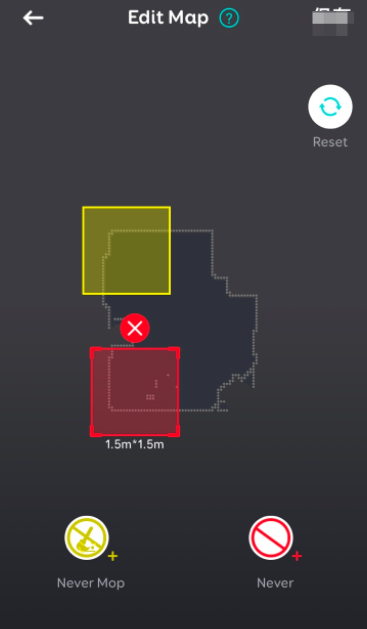

Step 5) Once you have created No-go zones according to your preferences, please select the Save button located on the top right corner of your screen.

Step 6) Your customized No-go zones are all set!  RoboVac L70 Hybrid will avoid these areas when it starts a new cleaning cycle.


Note: Please note when RoboVac L70 Hybrid is positioning itself according to its current location on the map, it has a minimal possibility of entering No-go zones.  However, if RoboVac L70 Hybrid fails to position itself and the map has existing No-go zones, it will prevent the RoboVac from deleting the map and No-go zones in order to prevent the RoboVac from entering No-go zones.


If you still have questions regarding how to create a No-go zone / virtual wall for RoboVac L70, please contact us for further assistance.

How Do I Create a No-Go Zone / No-Mop Zone for RoboVac L70 Hybrid?
184 undefined
How to factory reset my RoboVac's WiFi?
20059 views/1 likes/2025-04-07 18:24:15
What if My RoboVac Stops with Error S1? (for L70/G Series)
11153 views/4 likes/2025-04-07 18:23:27
How to connect RoboVac to WiFi? (For Android)
9403 views/9 likes/2025-04-07 18:04:53
What if my RoboVac runs with a loud noise?
6544 views/2 likes/2025-04-07 18:26:09
How to connect RoboVac to WiFi (For iOS)?
6028 views/1 likes/2025-04-07 18:04:52
eufy Warranty Policy
16144 views/1 likes/2024-11-27 10:27:18
When should I replace the battery on my eufy RoboVac?
8157 views/1 likes/2025-04-07 18:06:28
What should I do if my RoboVac is offline?
9702 views/1 likes/2025-04-07 18:06:39
‬⁡‌​⁢‬⁣‬‌⁢⁣‌⁣⁢⁢​⁤​⁣‬‬​‌​​⁣‌⁡‍‬​‬‍⁢⁤‍⁣​‍‌​‬⁢【T8010】【HomeBase 2】EU Declaration
T8113S_EU Declaration of Conformity
eufyCam_2C_Pro_Set_Manual_us
RoboVac 30C_Manual_EN
video_Doorbell_2K_(Wired)_Manual_us
Motion_Sensor_manual_us
View More
How to Connect RoboVac to iOS Devices
eufy 3-in-1 E20: Unboxing and Quick Start Guide Video
How to Install eufy Security Video Doorbell (Wired)
How to set up eufy Security Video Doorbell (Battery-Powered)
How to Install eufy Security Floodlight Camera
eufy Security App Functions
View More