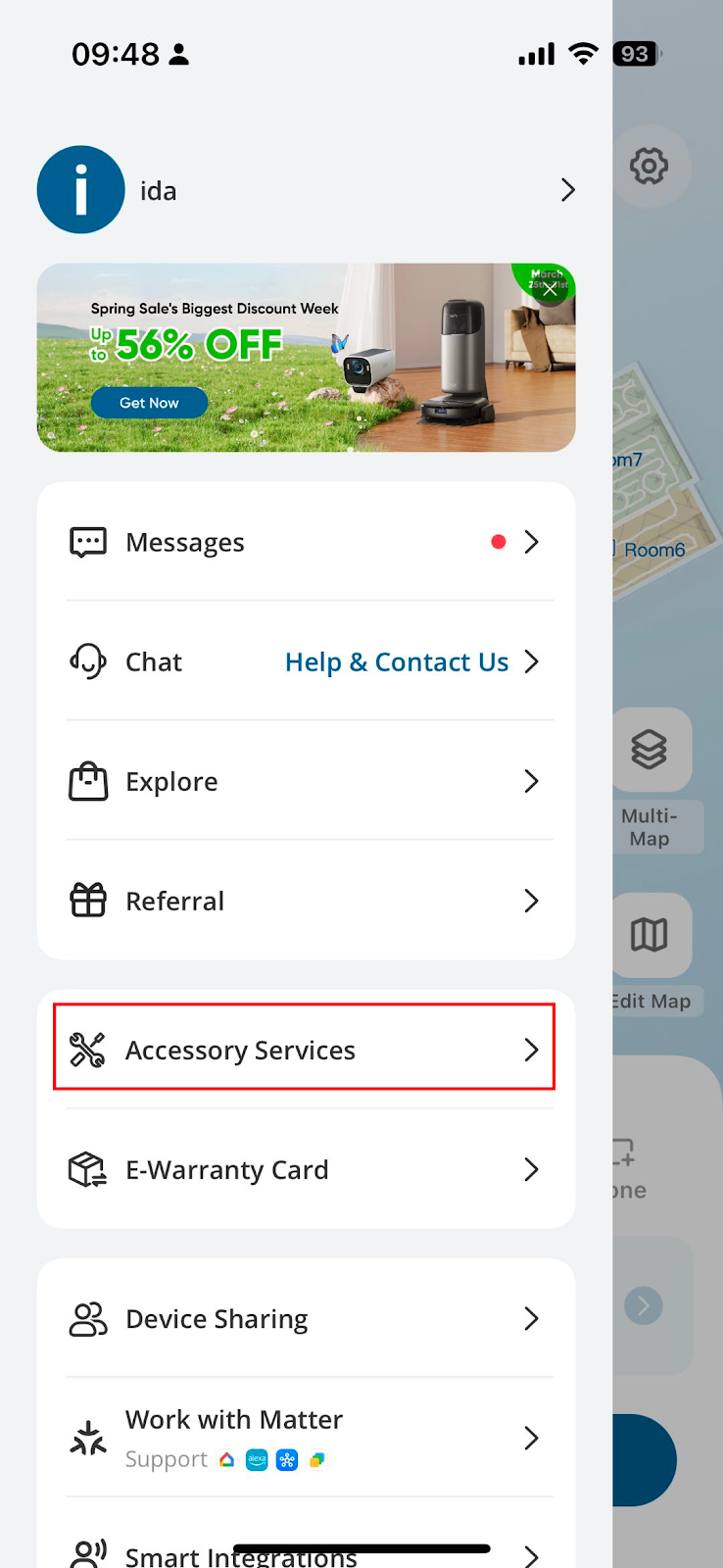
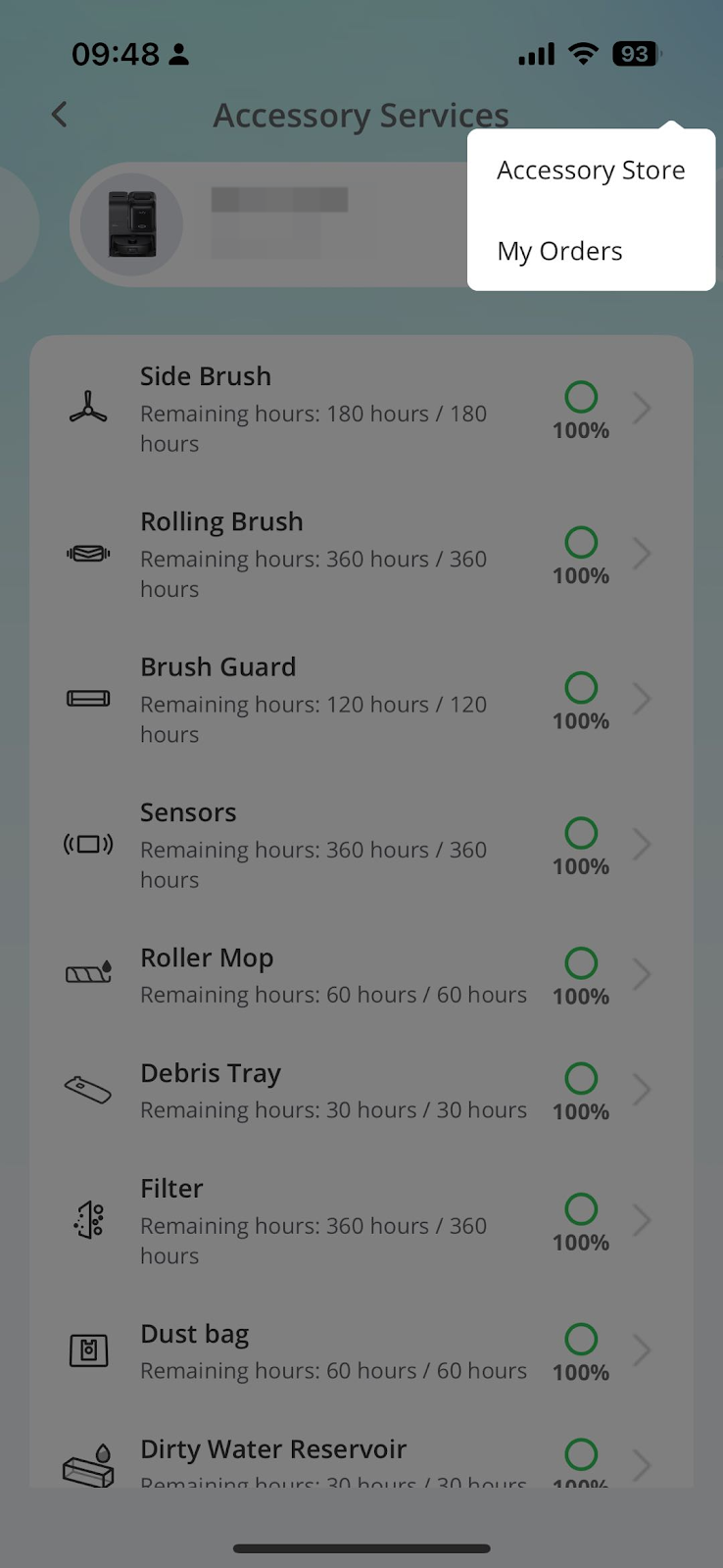
Parts Maintenance Schedule/Accessory Services on eufy Clean App for your E25/E28.

Parts Maintenance Schedule for eufy RoboVac


Depending on the model, the timeframe to clean a RoboVac and replace its consumable parts, such as filters and brushes, will be different. Please refer to the following information for both WiFi and non-WiFi RoboVac models.


For RoboVac models that support Parts Maintenance Schedule/Accessory Services


Only Dynamic and iPath navigation RoboVac models support Parts Maintenance Schedule/Accessory Services. The eufy Clean app can keep track of this for you and help remind you when it comes time to replace certain accessories.


Below are examples of several different RoboVacs and their part maintenance schedules as shown on the eufy Clean app. To get to this section, go to the eufy Clean app, press the image of the RoboVac > Top right menu > Accessory Services. If you tap on an accessory, it will give you detailed information on how to replace the accessory.
 

For RoboVac models that don’t support this feature


If your RoboVac doesn’t support parts maintenance schedule/accessory service, please visit How often should I clean or replace accessories of my RoboVac? for detailed information on the timeframe to replace consumable accessories.


If you still have questions regarding the parts maintenance schedule on eufy Clean app , please contact us for further assistance.

Unresolved icon
82 undefined
Using your RoboVac with Amazon Alexa
11856 views2 likes/2025-05-16 11:15:17
Can I change the registration email address of eufy app?
10928 views13 likes/2025-05-16 11:19:43
🤝How Your eufy Warranty Service Works
20926 views1 likes/2025-11-07 12:15:33
Using your RoboVac with Google Assistant
8690 views1 likes/2025-05-16 11:16:42
Welcome to the eufy Family! Your New E25 is Ready to Work!
19796 views14 likes/2025-05-20 12:30:28
Can I turn off the WiFi of eufy RoboVac?
4888 views2 likes/2025-05-16 10:25:20
Why WiFi RoboVacs do not Support 5GHz WiFi Connection
4808 views1 likes/2025-05-16 11:19:03
Download icon
eufy Clean X10 Pro Omni 取扱説明書 (T2351)
Download icon
X10 Pro Omni(T2351)- ユーザーガイド
Download icon
eufy Clean X10 Pro Omni Guida per L'utente (T2351)
Download icon
eufy Clean X10 Pro Omni Gebruikersgids (T2351)
Download icon
eufy Clean X10 Pro Omni Guide de l'utilisateur (T2351)
Download icon
eufy Clean X10 Pro Omni Guía del Usuario (T2351)
View More
Play videoeufy X10 Pro Omni How to Improve Mopping Performance
eufy X10 Pro Omni How to Improve Mopping Performance
Play videoeufy X10 Pro Omni How to Connect to Wi-Fi (iOS/Android)
eufy X10 Pro Omni How to Connect to Wi-Fi (iOS/Android)
Play videoeufy X10 Pro Omni How to Control eufy X10 Pro Omni via the eufy Clean App
eufy X10 Pro Omni How to Control eufy X10 Pro Omni via the eufy Clean App
Play videoeufy X10 Pro Omni Cleaning and Maintenance
eufy X10 Pro Omni Cleaning and Maintenance
Play videoeufy X10 Pro Omni How to Use the Self-Empty Station and Troubleshooting
eufy X10 Pro Omni How to Use the Self-Empty Station and Troubleshooting
Play videoeufy X10 Pro Omni Unboxing and Quick Start Guide Video
eufy X10 Pro Omni Unboxing and Quick Start Guide Video
View More
Contact Us
Buy on the eufy Store
Download the App
affirmamazonPayamexapplePaydinnersClubdiscovergooglePaymastercardpaypalshopPayvenmovisa
