Troubleshooting for Error 19 on L70 Hybrid
First of all, please confirm the details below:

- Whether your vacuum can still run and clean the floors despite the error
- If the issue happens at the same place, which might be related to the actual situation, please send us a picture of the surroundings
- Let us know whether the lidar spins while the vacuum is working.

Then you can try the following:

- Clean the laser sensors (lens) with a clean dry cloth and get any small debris out with a manual vacuum if possible.

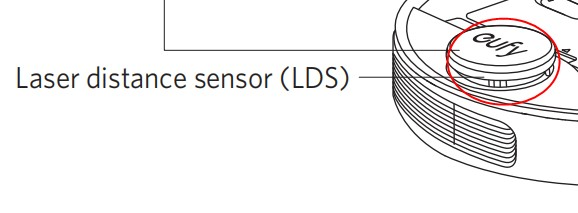
- Tap the white laser sensor cover with a eufy logo on it several times to make sure the cover can spring back and nothing gets stuck in the lidar section. Lift the cover a little bit to see if it helps.


image.png
- Power off by holding the start button until you hear the voice alert, after 5 minutes, turn it back on by holding the start button.

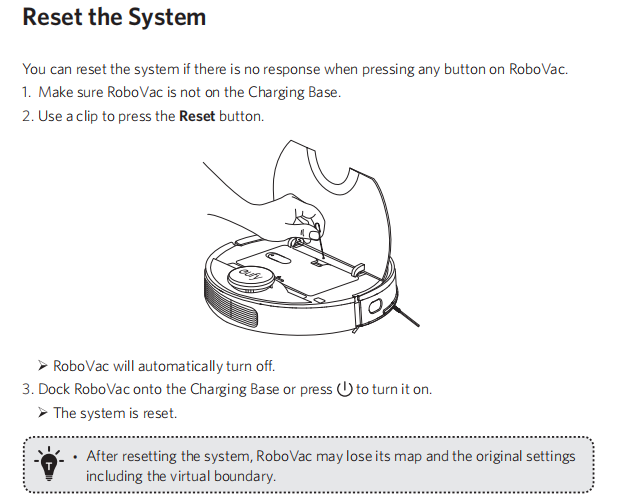
- If the above does not help, you can reset the vacuum to the factory settings. 


reset the system.png

If you need any further assistance, please contact us.
 
Unresolved icon
20 undefined
Download icon
RoboVac L70 Hybrid_Manual_INT
Download icon
RoboVac L70 Hybrid_Manual_RU
Download icon
RoboVac L70 Hybrid_Quick Installation Guide_EN
Download icon
RoboVac L70 Hybrid_Manual_TW
Download icon
RoboVac L70 Hybrid_Manual_JP
Download icon
T2190_UKCA&EU Declaration of Conformity
View More
Play video
How to Connect RoboVac to iOS Devices
Play video
How to Connect RoboVac to Android Devices
Play video
How to Share RoboVac Access with Others
Play video
How to Link Your RoboVac with Alexa
Play video
How to Link Your RoboVac with the Google Assistant
Play video
Connecting RoboVac to an Android phone (30C as an example)
View More
Contact Us
Buy on the eufy Store
Download the App
affirmamazonPayamexapplePaydinnersClubdiscovergooglePaymastercardpaypalshopPayvenmovisa