If your cleaning needs are primarily vacuuming, you can simply remove the mop pad holder(mopping module). It is designed for light surface cleaning without applying pressure, lifting, or vibration. Please note, this feature is intended for maintaining cleanliness on already well-kept floors and may not replace a dedicated mop for tougher stains or spills.
Please note that the X8 Pro Series does not automatically recognize carpets and lift their mop. To avoid this, we recommend setting up No-mop zones via the eufy Clean app prior to the robot mopping your floor.


Please refer to 0S-01:18 S in the following video for instructions on how to use the Mopping function:
eufy Clean X8 Pro Series: Clean and Maintain the Accessories
Before the robot starts mopping your floor, please first remove the stickers from the waterproof pad and install the waterproof pad beneath the Self-Empty Station / Charging Base to ensure the waterproof pad is securely affixed to the floor.

To fill the water tank, remove it from the main unit, open the water inlet cover, fill the water tank with water, and then close the cover. Please refrain from adding any non-eufy cleaning solution to the water tank as it may cause damages to the robot.

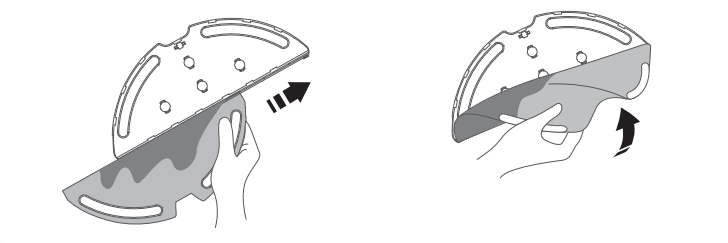
After filling the water tank and reinstalling it into the robot, please remove the mopping pad from the mop pad holder, wet it, and then wring out excess water. Slide the mop pad into the holder and smooth it out before installing it at the bottom of the robot until you hear a "click" sound.


Now, the robot is ready to mop your floor. The robot will automatically vacuum and mop. You can also select from three different water levels via the eufy Clean app during the mopping process.
The water tank volume is 260ml, and the mopping area per cycle will vary depending on your water level settings. Here are the details: Low water level: 1500 sqft Middle water level: 950 sqft High water level: 700 sqft
However, these figures are approximate, and actual coverage can be influenced by several factors. These factors include the type of floor surface, furniture density, room layout, carpeted area etc. Please note that user environments such as rough surfaces, high percentages of carpeted areas, and complex room layouts will reduce the total mopping area.
After the robot completes its mopping cycle, simply remove the water tank, empty any remaining water, and clean and air-dry the mopping pad to prevent mildew or unpleasant odors. With the X8 Pro Series, you will be able to enjoy a spotless, fresh-smelling home!

If you need any further assistance, please contact us.