The Robot Lawn Mower C15 is designed to navigate lawns automatically and recover from minor obstacles during operation. However, the mower may occasionally become stuck due to environmental conditions, hidden obstacles, terrain limitations, or mapping-related issues.
This article outlines common scenarios in which the mower may become stuck and provides recommended solutions for each situation.
Scenario 1: The Mower Gets Stuck Occasionally but Recovers Automatically
If the mower occasionally becomes stuck but is able to free itself and resume operation automatically, no action is generally required.
The mower is designed to:
-
Detect resistance or obstruction
-
Perform automatic recovery maneuvers
-
Resume mowing once the obstruction is cleared
Recommended Solution
-
Continue monitoring operation normally
-
No additional troubleshooting is necessary unless the issue becomes frequent or occurs repeatedly in the same area
Scenario 2: The Mower Repeatedly Gets Stuck in the Same Area
The mower may encounter terrain irregularities, narrow passages, soft ground, roots, or obstacles in a specific location that repeatedly interfere with navigation.
Recommended Solution
Use the No-go Zone feature to create a restricted area around the affected location and prevent repeated interruptions during mowing.
To prevent repeated interruptions:
-
Go to Edit Map → Add No-go Zone
-
Mark the affected area on the map
-
Save the settings
Alternative Solution
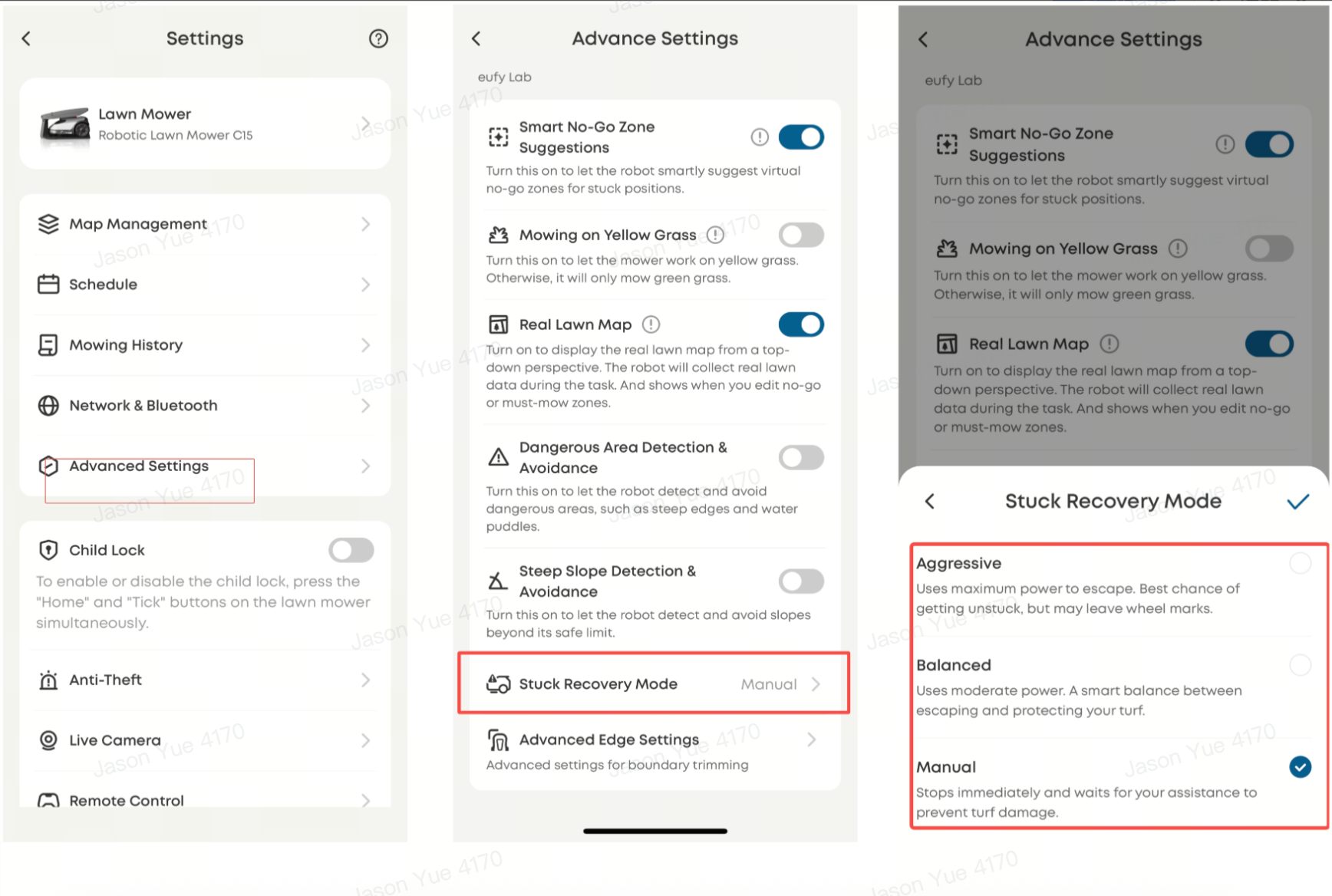
Adjust the Stuck Recovery Mode
-
Navigate to Advanced Settings → Stuck Recovery Mode
-
Select one of the following modes:
-
Balanced – Standard recovery performance
-
Aggressive – Stronger escape maneuvers
-
Manual – Reduced automatic recovery behavior
-
⚠️ Aggressive Mode provides the strongest recovery performance but may increase the risk of lawn damage. Use this setting carefully.
Scenario 3: The Mower Gets Stuck During Mapping
During the mapping process, the mower may become trapped in an unmapped or difficult-to-navigate area.
Recommended Solution
-
Enable Smart No-Go Zone Suggestions in the app
-
If necessary, manually move the mower to a previously mapped area so it can continue mapping successfully
Scenario 4: Hidden Obstacles Interfere With Navigation
Low-profile or difficult-to-detect objects may interfere with mower navigation, including:
-
Trampoline legs
-
Covered ground fixtures
-
Hidden edging materials
-
Other low obstacles
Recommended Solution
-
Mark obstacles with visible covers or markers
-
Use the No-go Zone feature to create a restricted area around the affected location and prevent future collisions or entrapment
Most cases of the Robot Lawn Mower C15 becoming stuck are caused by environmental conditions, repeated terrain challenges, or hidden obstacles. Using features such as No-go Zones and Stuck Recovery Mode, along with proper lawn preparation, can significantly improve navigation performance and reduce interruptions during mowing.
If you have any other questions regarding the Robot Lawn Mower C15, please don't hesitate to contact eufy Support Center for further assistance.