The Zone Clean feature allows you to clean a specific area without running a full-home cleaning cycle. It is useful for localized messes or areas that require more frequent cleaning, such as the dining room or kitchen.
Troubleshooting Steps
Step 1: Open the eufy App
Open the eufy app and select the Omni E35.
Step 2: Select Your Map
Open the map for the Omni E35.
Step 3: Select Zone Clean
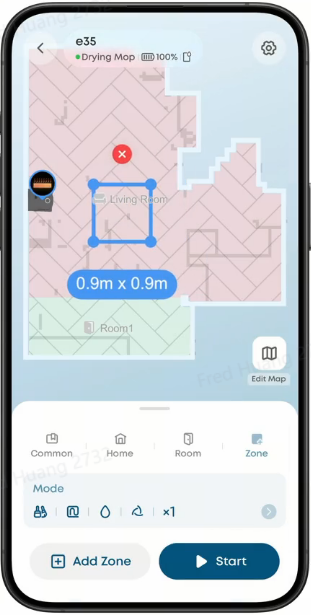
Tap Zone Clean.
Step 4: Select the Area to Clean
Draw or select the specific area you want the Omni E35 to clean. You can create custom cleaning zones for areas that require more frequent cleaning, such as the dining room or kitchen.
Step 5: Start Cleaning
Tap Start to begin cleaning the selected area.
Related Questions
Q1: When should I use Zone Clean?
Zone Clean is an efficient feature for localized messes and areas that need additional cleaning without running a full-home cleaning cycle.
Q2: Can I use Zone Clean for areas that need frequent cleaning?
Yes. You can create custom zones for high-traffic areas, such as the dining room or kitchen, and clean them as needed.
Q3: Should I use Zone Clean or Full-Home Clean?
Full-Home Clean is suitable for routine cleaning throughout your home, while Zone Clean is ideal for targeted cleaning and spot touch-ups. Combining both features provides flexible cleaning coverage for different areas of your home.
If you have any other questions about the Omni E35, please don't hesitate to contact eufy Support Center for further assistance.