Mop streaks or water marks left on the floor do not necessarily indicate a leak or product defect. In most cases, they are caused by the water volume setting, mop pad condition, or environmental factors such as humidity and floor temperature.
Troubleshooting Steps
Step 1: Reduce the Water Volume
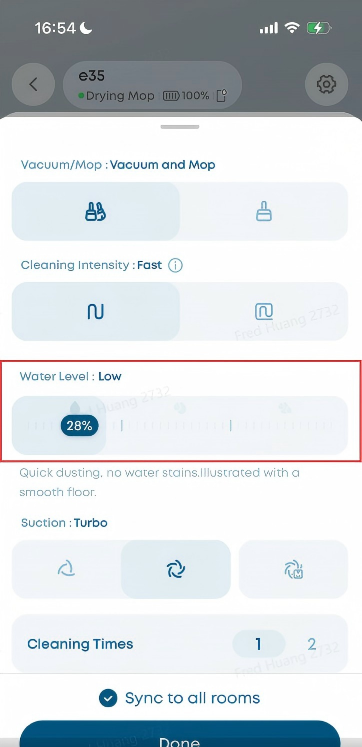
Go to App → Settings → Water Level and set the water level to Low or Medium. A high water volume can produce more visible streaks, especially on smooth flooring such as tile or marble.
Step 2: Check the Mop Pad Condition
Check the mop pad to make sure it is in good condition and is not excessively wet.
-
Too wet: The mop pad should be damp rather than dripping during normal use.
-
Worn out: An old mop pad may absorb water unevenly and leave streaks. Replace the mop pad every 3-6 months, depending on usage and condition.
-
Recently washed: Mop pad that has just been washed in the base station may contain more water than usual. As a result, the first few minutes of cleaning may leave more visible water marks. These marks should gradually become less noticeable as the mop pad reaches its normal moisture level.
Step 3: Consider Environmental Factors
Environmental conditions can affect how quickly water evaporates and how visible mop streaks appear.
-
High humidity: Water evaporates more slowly, making streaks more visible. Reduce the water volume if necessary.
-
Cold floors: Lower floor temperatures can slow evaporation and make water marks more noticeable. Reduce the water volume if necessary.
-
Dark flooring: Water streaks are generally more visible on dark floors than on light-colored floors, even when the amount of water used is the same.
Related Question
Q1: Why do water marks remain on the floor after the Omni E35 finishes mopping?
Water marks should disappear once the floor is completely dry. However, if your tap water has a high mineral content, white mineral residue may remain after the water evaporates. To help prevent this, use purified or softened water, or use the recommended floor cleaning solution.
If you have any other questions about the Omni E35, please don't hesitate to contact eufy Support Center for further assistance.