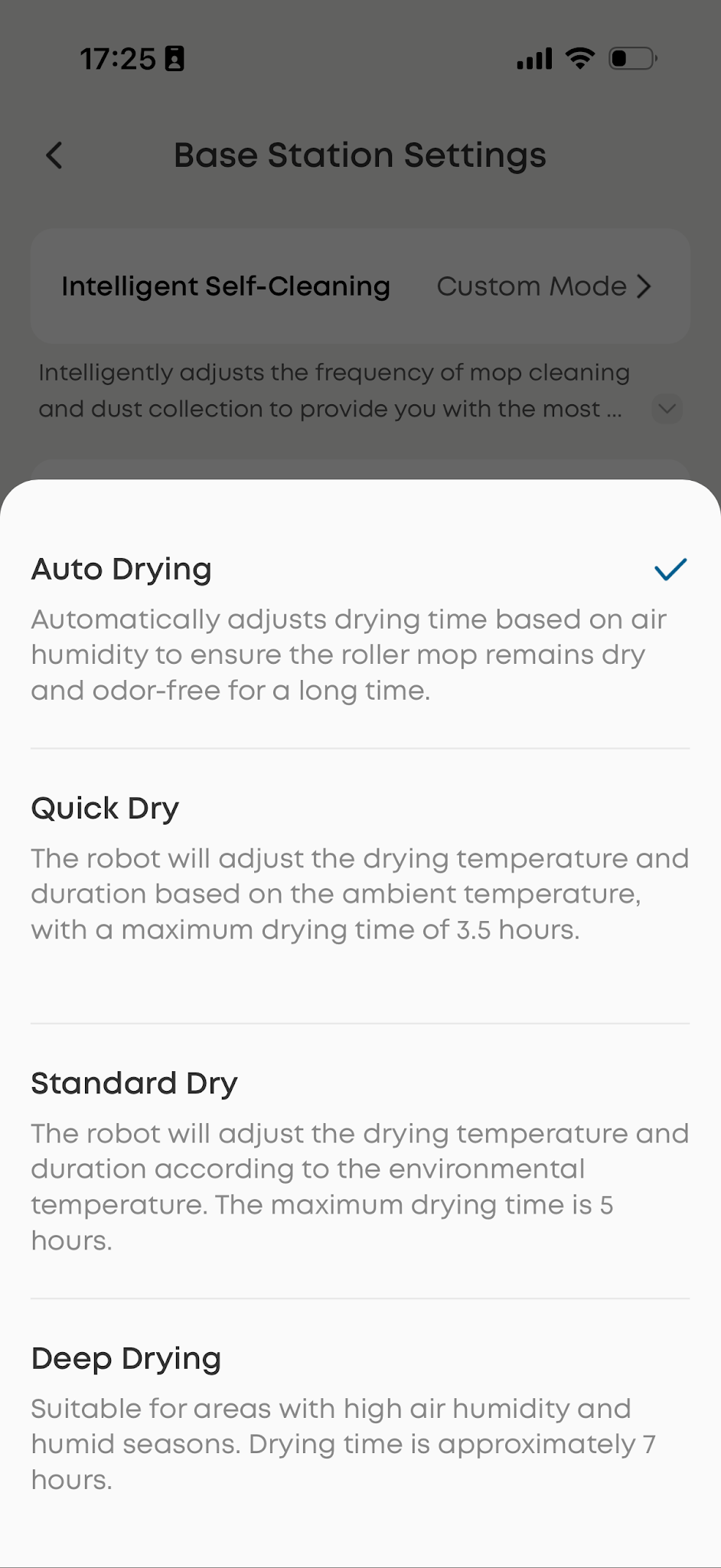
After the base station washes the mop pad, it automatically starts the hot air drying process. The drying duration can be adjusted in the eufy app, with three options: 3.5, 5, or 7 hours, allowing you to select the drying time based on your needs.
The Omni E35 uses mild, continuous hot air to protect the mop pad material and help extend its service life. This approach is different from the high-temperature, rapid drying used by a clothes dryer, so the drying process may take several hours.
Troubleshooting Steps
Step 1: Allow Sufficient Drying Time
A drying time of 3.5-7 hours is normal. Allow the drying cycle to complete before determining whether there is an issue with the drying function.
Step 2: Consider Environmental Factors
Certain conditions can extend the drying time, including:
-
High humidity: Moisture evaporates more slowly in humid conditions.
-
Low room temperature: A cold environment can reduce drying efficiency.
-
Excessively wet mop pad: Mop pad that contains more water after washing requires additional time to dry completely.
Step 3: Optimize the Drying Schedule
Consider starting mopping in the morning so the drying cycle can finish during the day. For overnight cleaning, Quiet mode can help minimize noise while the mop pad is drying.
Related Question
Q1: How do I skip or adjust the drying process on the Omni E35?
The drying process cannot be manually skipped. However, you can adjust the drying duration in the eufy app by selecting Quick Dry, Standard Dry, or Deep Dry. Drying the mop pad is important for helping prevent odor and bacterial growth.
If you have any other questions about the Omni E35, please don't hesitate to contact eufy Support Center for further assistance.